
Is ArtCraft worth trying?
It is worth a controlled trial for directed image and video experiments, especially if you can test providers and outputs. It is not a universal replacement for a mature creative suite.
ArtCraft is an open-source AI creative engine, not a one-click replacement for every Adobe application. It lets a creator direct scenes, compose references, choose a model provider and move toward an image or short video, while PhotoCraft covers adjacent finishing. This review covers the useful path, cost and privacy boundaries, desktop and browser limits, and tests before a client project. The verdict is conditional: interesting for directed creative experiments, not a universal production-suite substitute.
Read the ArtCraft facts All guides
Written against the build verified on 2026-10-18.
| Area | Review view | Reason |
|---|---|---|
| Creative direction | Promising | Scene, camera, pose and reference decisions are clearer than a bare prompt box |
| Local finishing | Use PhotoCraft or another editor | Layer, mask and export work is a separate stage |
| AI generation | Useful but provider-dependent | Models, accounts, network and price affect the result |
| Desktop maturity | Early and moving | Pin a release and test the features your project needs |
| Adobe replacement | No blanket replacement | ArtCraft covers selected creative stages, not an entire commercial suite |
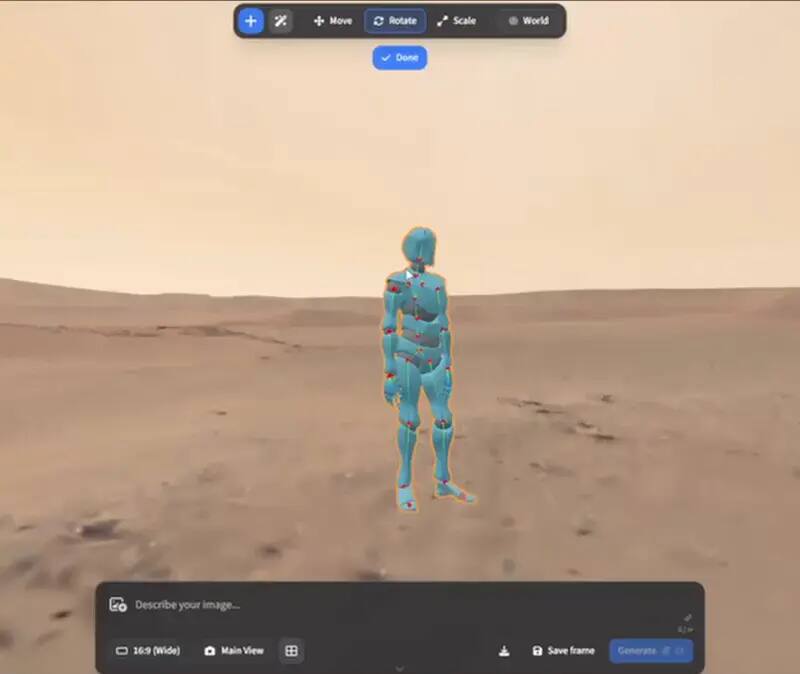
The most useful ArtCraft idea is treating an AI result as a directed shot rather than a mysterious answer. A creator can start with a still or a scene intention, arrange elements, set a camera or pose, choose an appropriate model route and inspect the result before moving on. That structure makes iteration easier to discuss with another person: change the camera, change the subject relationship, change the provider, or change the finishing step. It also exposes the real work that a short demo can hide. Good references, controlled inputs, output review and a plan for failed generations still matter.
A blank prompt is quick, but it leaves many decisions implicit. ArtCraft is more interesting when a project needs a repeatable scene concept: a character across shots, a product in a chosen composition, a reference image that needs to become a controlled variation, or a short clip whose motion should follow a plan. The interface and engine do not guarantee continuity or quality, but they give the creator a vocabulary for asking why a result changed. That is a meaningful benefit for exploration, storyboarding and visual prototyping, provided the final image or clip is still judged at its actual delivery size.
The application may be open source while a generation step is not free. Provider accounts, model selection, network access and per-image or per-video pricing can determine whether an idea is economical. A useful review therefore records the cost of a successful result and the cost of a retry, not only the licence headline. Local composition can be iterated without a per-run generation fee, while a provider-backed operation may incur a charge even when the output misses the brief. Teams should define who owns the provider account, how spending is capped and which files are permitted to leave the workstation.
The versioned desktop release and the official browser entry should not be treated as identical builds. The desktop asset gives you a release tag and a machine-specific runtime. The browser route is controlled by the upstream hosted application and can change independently. A browser page loading successfully does not prove that a desktop feature exists, that a project can be recovered offline, or that a large video export will work in the same way. Record the route, date, browser or operating system and upstream version whenever a tutorial or review relies on a specific behavior.
ArtCraft and a traditional image editor answer different questions. A pixel editor is strongest when the source is known and the creator needs precise layers, masks, typography, colour and export control. ArtCraft is strongest earlier in the ideation or directed-generation path, when the creator is exploring a scene, a reference relationship or a motion idea. PhotoCraft is the natural adjacent test for layered finishing in the Craft family. Calling ArtCraft an Adobe alternative is useful only when the page names the stage being replaced and the stages that still need another application.
Use a short, real-shaped brief with a defined subject, composition and delivery size rather than a novelty prompt.
Run a small change to camera, pose or reference and record whether the result responds in a useful, stable way.
Record successful and failed generations, account requirements, latency and the cost of the retry loop.
Open the result in the intended editor and check layers, colour, metadata, crop and export quality.
Close and reopen the project or repeat the workflow from the saved inputs before treating it as production-ready.
Art directors, independent creators, developers and technically curious teams are the best first audience when they can afford an evaluation loop. It is a good fit for visual exploration, shot planning, controlled experiments and workflows that benefit from seeing the scene decisions. It is a weaker fit when a team needs mature collaboration, predictable long-form editing, a guaranteed local-only path, an established support contract or a single application that owns the whole Adobe-shaped suite. In those cases, test ArtCraft as one stage beside the current tool instead of presenting it as the only replacement.
ArtCraft is worth trying if the value is directed creative experimentation and you are comfortable checking upstream releases, providers and outputs. Its strongest promise is a more structured creative engine around image and video decisions. Its main risks are the usual early-project risks plus provider cost and data-path ambiguity. The fair verdict is not “Adobe is dead” or “this replaces every editor.” It is: use ArtCraft for the creative stage it actually covers, pair it with a proven finishing tool, and upgrade the workflow only after your own file, cost and recovery evidence passes.
A serious review produces more than a favourite image. Keep the brief, the reference assets, the scene decisions, the model and provider, the number of attempts, the cost, the release tag and the final export. Note which parts were local and which parts depended on an account or network call. Ask another person to inspect the result without the creator explaining every correction; that reveals whether the workflow is understandable or only successful in the hands of its author. Reopen the project after a break, make one controlled change and export again. If the result cannot be recovered, the weakness is operational rather than aesthetic. The best ArtCraft trial is therefore a small production rehearsal: it shows where the tool creates leverage, where a traditional editor must take over, how much a retry costs and what evidence a client or teammate would need before accepting the output.
It is worth a controlled trial for directed image and video experiments, especially if you can test providers and outputs. It is not a universal replacement for a mature creative suite.
The open-source application and local composition work are different from provider-backed generation. Accounts, network use and per-run model pricing can still apply.
Not as a blanket claim. ArtCraft handles a different creative stage; use a layered editor such as PhotoCraft for precise pixel, PSD, mask and export work.
Do not assume full offline operation. Some local composition may work without a provider call, while generation and browser paths can require network access, accounts or external services.
Teams needing mature collaboration, guaranteed local-only processing, stable suite parity or a support contract should keep their current tool while running a bounded pilot.