
Is ArtCraft a free Photoshop alternative?
It can be an open-source alternative for selected AI creative steps, but it is not a complete Photoshop replacement. Layered editing, PSD handoff and precise finishing need their own tool and tests.
ArtCraft and Photoshop are compared for image creation, but they solve different parts of the job. ArtCraft directs scenes, references and selected AI generation steps. Photoshop is a mature pixel editor with established files, layers, masks, typography and delivery conventions. The useful question is whether ArtCraft covers your creative stage, and where Photoshop or another editor still owns finishing and handoff work.
See the ArtCraft facts All comparisons
Written against the build verified on 2026-10-18.
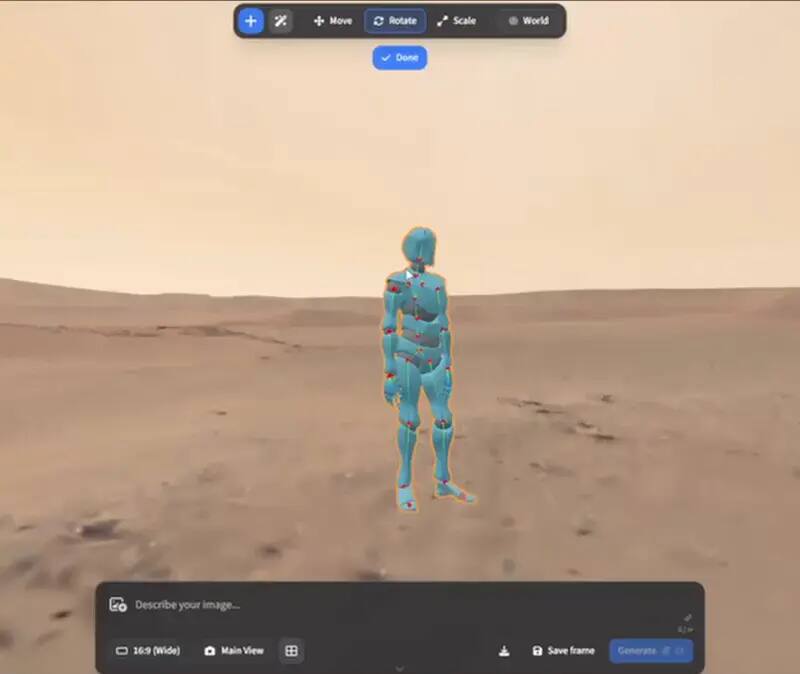
Choose ArtCraft when the primary job is directed AI exploration: arrange a scene, work from a reference, test a camera or pose, select a model route and iterate toward an image or short video. Choose Photoshop when the primary job is precise layered editing, retouching, typography, colour, compositing, asset delivery or a PSD handoff that must behave predictably in an established team. The tools can sit beside each other. ArtCraft may produce an input or concept; Photoshop or PhotoCraft may finish the pixel work. A comparison that calls one a total replacement hides the actual workflow boundary.
| Dimension | ArtCraft | Photoshop | Practical decision |
|---|---|---|---|
| Core job | Directed AI image and video workflow | Layered pixel editing and compositing | Choose the stage that creates the most risk for your brief |
| Starting point | Scene, reference, direction and model provider | Pixels, layers, selections, masks and source assets | A hybrid path can be more useful than a replacement claim |
| File question | Check the current project and export path | PSD and established delivery conventions | Use a receiving-application round trip |
| Cost shape | Open-source app plus possible provider charges | Commercial licence or plan and related services | Measure success and retry cost, not only licence price |
| Privacy shape | Depends on local app, browser and provider | Depends on install, account, services and workflow | Map the actual data path for both |
| Best first test | One directed scene with a defined output | One layered file with the required handoff features | Test with a real-shaped but redacted asset |
ArtCraft’s value is the ability to make creative direction explicit around an AI workflow. It can be useful when a creator is exploring a subject, composition, camera or motion idea and wants to compare iterations. Photoshop’s value is control over known pixels and the structured file that carries them: layers, masks, type, adjustment decisions, selections and export settings. One can produce a promising starting point while the other can make a deliverable precise. The difference is not a missing marketing feature; it is the kind of object each workflow treats as primary.
If the final delivery is a PSD with editable layers, a text treatment, a colour-managed export or a client revision path, the receiving application decides whether the workflow passes. ArtCraft’s generated image or scene output may be a useful source, but it does not automatically become a Photoshop document with the same edit history. Save the source references and export, then open the result in the editor and check resolution, colour, transparency, crop, metadata and any layer structure that matters. A flattened image can be an excellent output for one job and an unacceptable handoff for another.
“Free Adobe alternative” can mean different things. An open-source application can avoid a software licence while a model provider still charges for generation, needs an account or processes data on its own service. Photoshop can carry a predictable plan cost while reducing some editing and handoff risk. Compare the cost of a finished asset, including failed generations, review time, retouching, export and storage. If the ArtCraft stage needs three retries and a separate editor, the correct comparison is the complete workflow, not the first button a user clicks.
Neither product name answers the privacy question by itself. Ask whether the source image is opened locally, whether a browser service receives it, which model provider sees a prompt or reference, whether an account is required, and where the resulting project is stored. OpenCraftTools provides no account or server-side recovery for the linked editor pages, but it cannot control an upstream app or provider. Photoshop workflows also vary according to desktop, account, cloud document and service settings. Use a redacted test and keep the final data-flow decision with the person responsible for the project.
Define subject, composition, output size, file type, delivery date and the edits the recipient must be able to make.
Record direction, provider, account, retries and output quality using a safe reference.
Use the same source or a comparable asset and perform the edits that matter to the delivery.
Reopen the files, inspect layers and metadata, check export quality and ask the receiving person to perform one revision.
Include software, provider, retries, human review, storage and the cost of a failed or late handoff.
PhotoCraft is the more direct Craft-family comparison when the question is an open-source Photoshop-shaped editor. It is aimed at layered pixel work, PSD and PSB handling, masks, adjustments and a browser or desktop path. ArtCraft is complementary: it helps with a directed AI creative stage. Linking the two pages is more honest than putting every Craft project into one replacement bucket. A user who wants to replace a specific Photoshop operation should start with the operation—generation, compositing, retouching, typography, file conversion or export—and choose the page that actually describes it.
For a creator exploring an AI-directed scene, ArtCraft is the more relevant first experiment. For a production designer revising a layered client file, Photoshop or a tested pixel editor remains the safer baseline. For a team seeking an open-source path, combine ArtCraft with PhotoCraft only after each stage passes its own release, provider, file and recovery checks. The answer to “ArtCraft vs Photoshop” is therefore a workflow map: ArtCraft may replace a narrow ideation or generation step; it does not replace every Photoshop responsibility or every mature delivery convention.
The comparison becomes more useful when the team stops trying to force one winner. Use ArtCraft to make and test a visual direction, then move a deliberately exported asset into a layered editor for cleanup, type, colour and delivery. Keep the original reference and the generated output separate, because a flattened handoff can make a later revision impossible. If the client changes the subject, camera or motion, return to the ArtCraft stage; if the client changes a mask, label or crop, return to the finishing stage. This division also makes costs easier to see. Provider retries belong to the generation budget, while retouching and review belong to production time. A hybrid workflow may use more than one application, but each application has a narrower promise and a clearer acceptance test. That is often safer than asking an early AI tool to impersonate a complete pixel-production suite.
It can be an open-source alternative for selected AI creative steps, but it is not a complete Photoshop replacement. Layered editing, PSD handoff and precise finishing need their own tool and tests.
ArtCraft fits directed AI image and video exploration; Photoshop fits mature layered editing and delivery. The better choice depends on the stage and file handoff your project requires.
Do not assume that. Use PhotoCraft or another layered editor for the PSD/PSB question and verify the exact file features with a round-trip test.
The application may avoid a software licence, but model-provider accounts, per-run charges, retries and finishing work can still cost money. Compare the complete successful workflow.
Yes, as separate stages: ArtCraft for directed exploration or generation, then Photoshop or another editor for controlled finishing, review and delivery.