
Is ArtCraft a replacement for Adobe?
Not as a whole suite. ArtCraft covers AI scene direction and generation workflows; Adobe applications remain broader and more mature for many editing, vector, video and production handoff tasks.
ArtCraft and Adobe are not two versions of the same product. ArtCraft is an open-source tool for directing AI imagery, compositing scenes and sending selected steps to model providers. Adobe is a family of mature apps for image editing, vector design, video and motion. The useful comparison is a workflow decision: which stage does ArtCraft cover, and which Adobe application owns delivery? This page answers “Adobe open source clone” without pretending one Craft app reproduces an entire commercial suite.
Read the ArtCraft facts All comparisons
Written against the build verified on 2026-10-14.
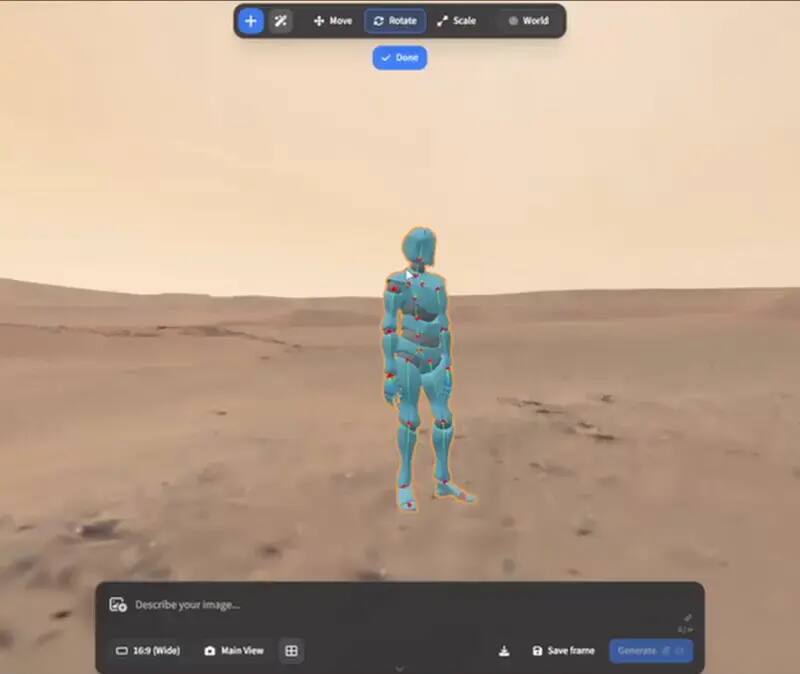
Choose ArtCraft when the hard problem is directing a generated shot: arranging references, setting depth and camera, posing a character, or turning a still into a short motion result. Choose the relevant Adobe application when the hard problem is mature production delivery: exact document compatibility, established plugins, specialist colour and print workflows, team conventions or support. Many real workflows can use both rather than replacing one with the other.
| Aspect | ArtCraft | Adobe workflow | Decision |
|---|---|---|---|
| Primary job | Direct and compose AI imagery, scenes and motion steps | Separate mature apps for raster, vector, video and motion production | Start from the task, not the brand |
| Generation model | Model choice is part of the step and may involve an external provider | Product and provider terms vary by the Adobe app and plan | Read the provider terms for the exact step |
| Desktop reach | Current v0.41.0 desktop assets cover macOS and Windows | Supported platforms and requirements vary by application | Check the machine before committing |
| Browser surface | Official site links to a separate browser entry | Adobe also has web surfaces with their own feature and account boundaries | Do not equate “online” with local |
| File handoff | Keep the ArtCraft project and release tag while the workflow evolves | Mature Adobe formats and production handoff conventions are broader | Test the files your client actually sends |
| Automation | Workflow-level control and provider calls depend on the project and selected step | Adobe automation uses its own scripting, plugins and APIs | Compare one repeatable operation |
| Risk profile | Open source and fast-moving; alpha behavior must be recorded | Mature ecosystem with subscription, support and compatibility trade-offs | Choose the risk your deadline allows |
The most useful mental model is not “free Adobe clone”. ArtCraft sits before or around the traditional finishing stage. It helps you specify the shot instead of asking a model to invent every decision from a sentence. That is valuable when a reference image, camera relationship or subject pose matters. Once the shot exists, you may still need a layered editor for masks and type, a vector tool for paths and logos, and a video editor for timeline delivery. PhotoCraft and VectorCraft are the natural adjacent projects in this family, but neither claim makes them drop-in Adobe replacements.
A mature application earns its place through the edge cases: a client file with unusual effects, a plugin your studio already depends on, a print profile that must survive handoff, a team template with years of conventions, or a deadline where an alpha compatibility gap is unacceptable. If the work depends on one of those, keep Adobe or another mature fallback available while you test ArtCraft. A feature checklist cannot prove that a real file will round-trip correctly.
The licence comparison is also narrower than a price badge. ArtCraft publishes open-source application code and does not turn this portal into a subscription or download mirror. A generation request can still involve a model provider, network access and provider-specific cost. Adobe workflows carry their own plan, account and product terms. In either case, the person responsible for a deliverable still owns the practical questions: where the source files live, who can access them, which licence covers the output, and whether the team can reproduce the result six months later. Record those decisions beside the project instead of treating “free” or “commercial” as a complete legal answer.
“Adobe” is a suite label, not one competitor surface. Photoshop is the relevant reference for layered raster finishing, Illustrator for vector paths and print-oriented artwork, and Premiere Pro or After Effects for timeline and motion work. ArtCraft overlaps these workflows only at the creative stage where a scene is planned, generated or moved. A fair pilot therefore chooses one Adobe application and one output, then records the exact handoff: a layered still, a vector export, a short clip or a project someone else must continue. That keeps the page useful and prevents a broad brand comparison from hiding a specific compatibility failure.
Choose a concrete task such as generating a reference still, directing a camera move or producing a short motion draft.
Keep the source images, project file, model/provider, release tag and the final export.
Use the existing Adobe workflow as the reference for what the client actually receives, not as a theoretical feature list.
Judge fidelity, time, repeatability, licensing, hardware and recovery when something goes wrong. Adopt ArtCraft for the stage it wins, not for a slogan.
Not as a whole suite. ArtCraft covers AI scene direction and generation workflows; Adobe applications remain broader and more mature for many editing, vector, video and production handoff tasks.
They solve different primary problems. ArtCraft directs generated imagery and scenes; Photoshop is a mature pixel-editing workflow. Choose by the stage and files you need to deliver.
Not directly. VectorCraft is the relevant Craft project for vector work, while ArtCraft focuses on AI imagery and scene direction. Neither should be described as universal Illustrator parity.
Do not assume broad native Adobe-file compatibility from the workflow relationship. Test the exact file and keep the originating project until the handoff is accepted.
Use the established Adobe workflow where mature compatibility and support are mandatory; pilot ArtCraft where controllable AI scene work can save time without putting the final handoff at risk.