
Layers, masks and adjustment layers
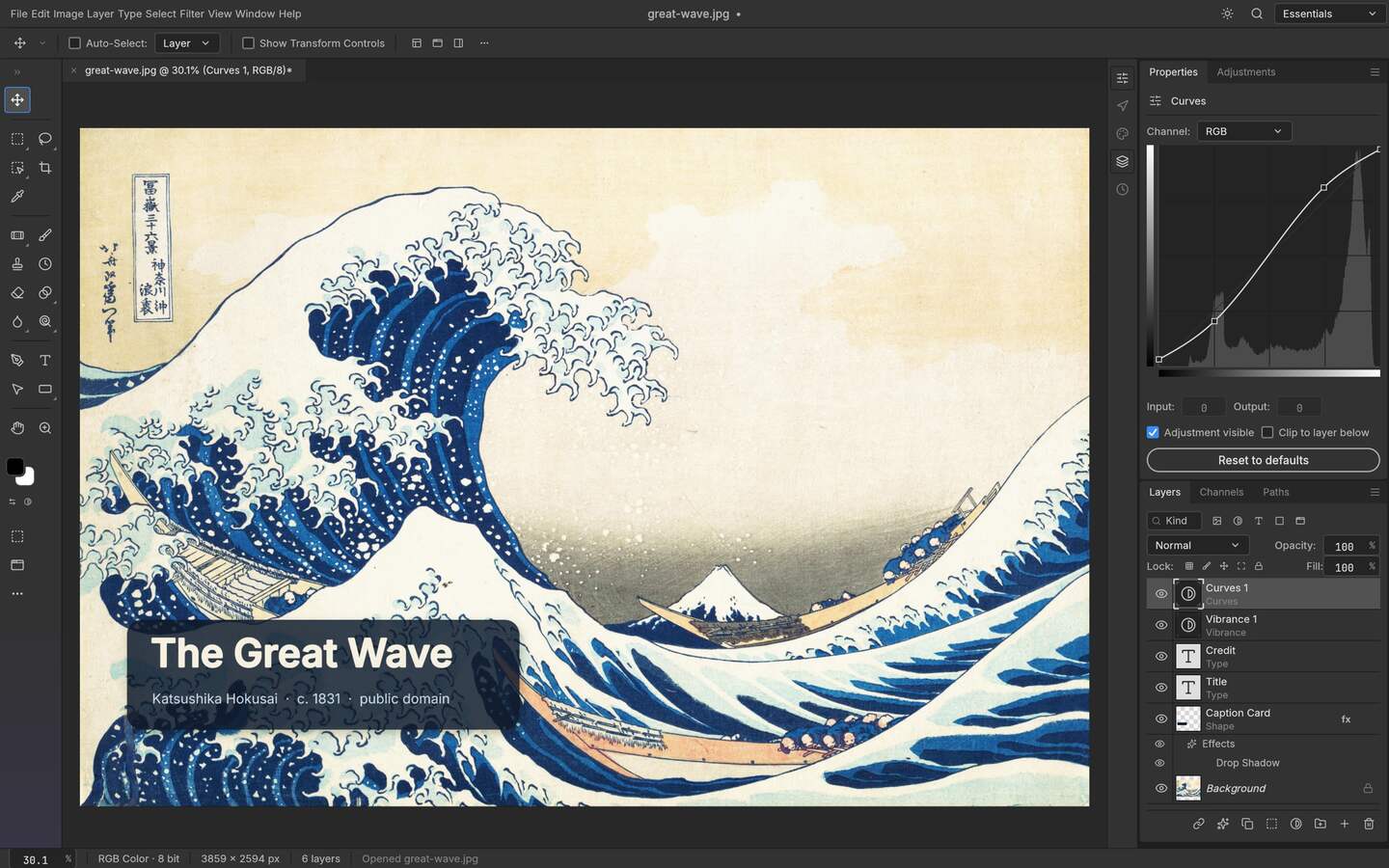
Composites are built from real layers with masks, adjustment layers, layer styles, text, vector shapes and brushes — the model Photoshop users already know.
Early alpha · MIT or Apache-2.0 · v0.9.0
PhotoCraft is an open-source photo editor written from scratch in Rust, built around the document model people already use: layers, masks, adjustment layers, text, vectors and brushes, with layered PSD as a format it reads and writes rather than imports. It installs on Linux, Windows, macOS and FreeBSD, ships a WebAssembly build, and can be driven from a command line, a JSON action file or an MCP client.
Open upstream release Try PhotoCraft in your browser Read the source
| Platform | Architectures | Build formats | Where work runs |
|---|---|---|---|
| Linux | x86_64, aarch64 | AppImage, deb, rpm, flatpak, tar.gz | Local: your CPU, GPU and files |
| Windows | x64, arm64 | MSI installer, portable zip | Local: your CPU, GPU and files |
| macOS | universal (Apple silicon and Intel) | DMG | Local: your CPU, GPU and files |
| FreeBSD | x86_64 | tar.gz | Local: your CPU, GPU and files |
| Browser (WebAssembly) | any modern browser | photocraft-web-0.9.0.zip | Browser build; confirm the current hosting and file boundary upstream |
| CLI | macOS universal build | photocraft-cli-0.9.0-macos-universal.zip | Command-line or agent workflow; verify the installed release before batching |
Composites are built from real layers with masks, adjustment layers, layer styles, text, vector shapes and brushes — the model Photoshop users already know.
Layered PSD and PSB files can be opened, edited and saved back, with the result depending on the document features the current release supports. The repository publishes a compatibility test suite for the format.
Metal, Vulkan, DX12 and WebGPU back ends, selected per platform, so canvas work stays responsive at full resolution.
The same Rust core compiles to desktop binaries and a WebAssembly bundle, so the browser build is not a separate toy engine.
Drive the editor from a command, a JSON action file or an MCP client, which is what makes batch work and agent automation possible.
Apply an action set across a directory of files instead of clicking through each one by hand.
Run one filter over a file
photocraft-cli run input.psd \ --cmd filter.sharpen.smartSharpen \ --params '{"amount":80}' \ --out output.pngCommand syntax is documented by the upstream project; verify against your installed version before relying on it in production.
Batch a folder from an action set
photocraft-cli batch --actions grade.json --in ./raw --out ./gradedOne JSON action file drives the whole directory.
Expose PhotoCraft to an MCP client
photocraft-cli mcpLets an agent that speaks MCP drive the editor headlessly.
This is an upstream preview of PhotoCraft. It helps you recognise the workflow, but it is not a promise that every panel, model or file format is unchanged in v0.9.0. Use the release and source links above for the version-specific truth.
Browser experience
Target workflow: layered PSD, masks and reversible adjustments. The editor opens in the upstream application; This portal does not upload, proxy or retain your files.
Most free editors are either a wrapper around an existing raster library or a browser toy with a layers menu. PhotoCraft is a from-scratch implementation of an editor, and that choice shows up in three places: a document model that keeps layer structure when it saves a PSD, a rendering engine that talks to your GPU through the APIs your platform actually provides, and a command interface that lets the same engine run without a person at the keyboard. The name of the target is easy to miss in that list. It is not "a free Photoshop clone". It is an editor whose files stay editable, which is a smaller claim and a much more useful one.
A language choice is only interesting when it changes what you can do with the product. Here it changes two things. First, one core compiles to desktop binaries and to a WebAssembly bundle, so the browser version is the same engine rather than a separate reimplementation that loses features whenever the desktop one adds them. Second, a memory-safe engine is what makes it realistic to hand a compositor to a script or an agent: an automation that crashes halfway through four hundred files is worse than no automation, and the class of crash that a rewrite in Rust is meant to remove is exactly the one you meet when nobody is watching the process.
The working model is stacking rather than painting. Adjustment layers sit above the pixel data and apply downward, so an exposure decision stays a decision you can revisit. Masks hide without deleting, which means the file you send back still contains what you decided not to show. Layer styles, text and vector shapes exist as their own kinds of object rather than as baked pixels. This is the vocabulary of a commercial editor, and the reason a file produced here can be handed to a colleague without an apology attached to it.
Reading a PSD is common; writing one back with its structure intact is the rare part. PhotoCraft treats PSD and PSB as working formats and carries a compatibility test suite for them in the repository. Two consequences are worth planning around. You gain the ability to do real client work on a machine that has no commercial licence attached to it. You also inherit an alpha project's boundaries: some layer styles come back approximate, nested smart objects are a known weak point, and a file from an unusual producer can reveal a gap. The practical answer is the same one you would use anywhere: keep a flattened reference, save the project before exporting a delivery copy, and check structure on open rather than discovering it on handoff. The comparison guide walks through exactly which elements survive the round trip.
Compositing at full resolution is a rendering problem before it is an editing problem, and the editor selects a back end per platform: Metal on Apple platforms, Vulkan on Linux, DX12 on Windows, WebGPU where a browser exposes it. That matters most on large canvases, where a raster pipeline gives you a laggy preview and a GPU pipeline gives you the actual image. The WebAssembly build applies the same idea in a tab: it is the desktop core compiled for the browser, so nothing uploads to a server for your pixels to come back. It is not a hosted service, and on modest hardware it will feel like a desktop engine running inside a browser rather than a lightweight web tool.
The part that puts PhotoCraft in a different category from most free editors is that you do not have to use it by hand. A command-line binary runs a single operation against a file. A JSON action file describes a sequence and applies it to a directory. An MCP server exposes the same operations to a program that speaks MCP, which is how an agent ends up doing the repetitive half of a job while a person handles the half that needs judgement. That is a real workflow difference: the person who retouches five hundred product shots one panel at a time and the person who defines the grade once and lets a script apply it are not doing the same work.
It is not generative: there is no model inside the editor, and AI imagery belongs to ArtCraft rather than here. It is not a Photoshop replacement in the sense of parity — plugin compatibility, specialist typography and pre-press depth are places a two-decade commercial product simply has more. It is not finished: the project describes itself as early alpha, panels move between releases, and the right way to read any claim on this page is as a statement about a specific build. None of that makes it the wrong tool; it makes it a tool with a scope, and the scope is exactly what an editor-shaped, file-honest, scriptable raster workflow needs.
It is an editor with a similar document model, not a parity replacement. Layered files, masks and adjustment layers work in the way you expect; plugin compatibility, some effects and specialist print workflows are where a commercial product still has more depth built up over years.
Yes, that is its central design goal. Layers, groups, masks, adjustment layers and text come back as editable objects, with layer styles and nested smart objects the areas to verify against a reference export.
No. Both the desktop builds and the WebAssembly build process locally. There is no account, no upload endpoint and no project storage behind the editor.
Yes. A CLI runs a single operation, a JSON action file applies a sequence across a directory, and an MCP server lets an agent drive the editor. The published release includes a dedicated CLI archive.
Plan around the alpha. Save the project file before exporting, keep a flattened reference, and check which release your guide was written against. People who treat it as a dependable fallback alongside a mature editor have a better time than people who expect a stable release line.