
2D compositing with control
Compose generated and captured stills into a scene you can keep adjusting, instead of accepting the first render.
Active development · MIT or Apache-2.0 · artcraft-v0.41.0
ArtCraft is an open-source AI creative software project for artists, designers and filmmakers working with generated imagery. Instead of one prompt producing one answer, you build the shot: a 2D composite, a scene with depth and camera, a pose to direct, then a model of your choosing to render each step. This page covers what that means in practice on the current desktop build, including the parts that cost money and the parts that do not exist yet.
Open upstream release Try ArtCraft in your browser Read the source
| Platform | Architectures | Build formats | Where work runs |
|---|---|---|---|
| macOS | universal | DMG, app tar.gz | Local composition; generation calls a model provider |
| Windows | x64 | setup.exe, MSI | Local composition; generation calls a model provider |
| Browser (official web entry) | modern browser | External browser app | External web application; upstream controls availability, files and provider behavior |
Compose generated and captured stills into a scene you can keep adjusting, instead of accepting the first render.
Place elements in a scene, set camera and depth, then render the composite back into the 2D workflow.
Drive subject pose and framing rather than hoping a prompt lands the shot.
Turn a still into a scene or a short move, with the source image kept as the reference.
Pick which model answers a step; the workflow, not one vendor, is the unit of work.
This is an upstream preview of ArtCraft. It helps you recognise the workflow, but it is not a promise that every panel, model or file format is unchanged in artcraft-v0.41.0. Use the release and source links above for the version-specific truth.
Browser experience
Target workflow: controllable image generation, compositing and video experiments. The editor opens in the upstream application; This portal does not upload, proxy or retain your files.
A prompt is a request; a composition is a specification. The difference is what ArtCraft is built around. You are not asking a model to imagine your shot from a sentence and then accepting whichever of four attempts is least wrong. You are assembling the shot from parts you can control — the plate, the subject, the layout in space, the camera, the movement — and handing a model a much narrower problem to solve. That framing is why the interface looks like a compositor rather than a chat box, and why the project describes itself as a crafting engine rather than a generator.
Everything starts as a still: a generated plate, a photographed element, a cut-out, a background. Compositing them means placement, masking, scale, colour relationship and edge treatment — the ordinary vocabulary of image work, applied to material that arrives from models rather than from a camera. This step matters more than it looks, because a composite with a clean silhouette and unambiguous depth gives a downstream video model something it can move correctly, and a cluttered one gives it something to invent.
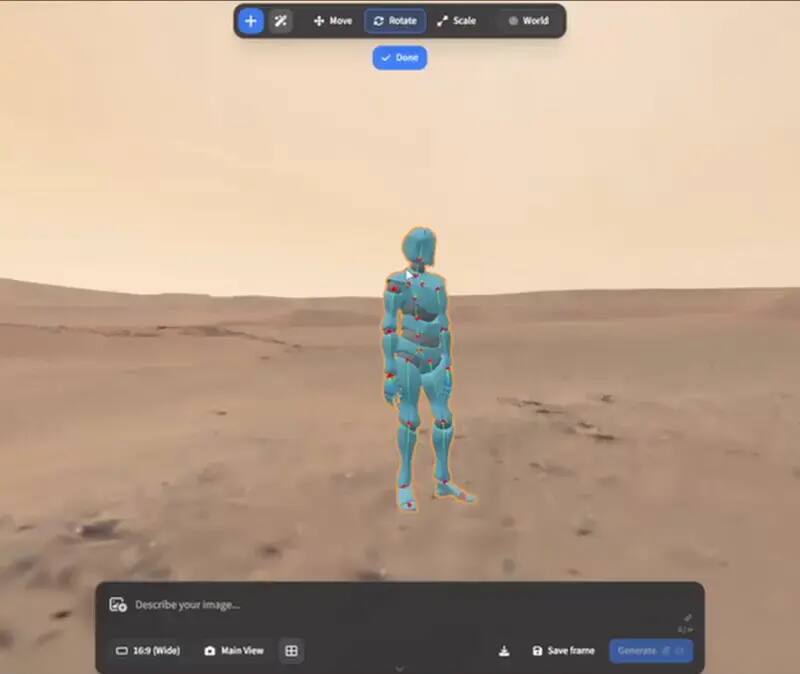
Moving an element into a 2D/3D scene is where the tool earns its name. Depth placement gives you parallax; a camera position gives you framing that survives the generation step instead of drifting during it; character pose direction lets you decide how a subject sits rather than persuading a model to guess it. In practice this is the difference between a shot that looks like a still with a filter applied and a shot that reads as a camera in a place. It is also the part that is most sensitive to what the selected model can actually do, which is the honest reason the workflow and the model are treated as separate choices.
Two conversions carry most of the interest. Turning a still into a scene means reconstructing depth so a flat image can be moved through — useful when a client approved a frame and now wants camera motion from it. Turning a still into a short clip is the image-to-video step, and the workflow discipline is the same in both directions: the source image stays the reference, the request stays short, and the result is judged as motion at full size rather than as a thumbnail that flatters it. A short clean take is worth more than a long one you have to rescue.
No single provider is best at every step, so the engine treats the model as a parameter of the step rather than an identity of the product. Practical consequence: you keep accounts and pricing with whoever you choose, and ArtCraft sits above that. It also means a claim about output quality is a claim about your model plus your inputs — the engine organises the work, it does not conjure capability that the provider does not have.
Composition, scene layout, camera and pose all happen locally: no cost, no queue, and you can iterate as long as you like. The moment a step requests a generation, you are using a provider account and spending per image or per second of video, with the video step being both the slowest and the most expensive. That ratio is worth internalising before a session: an hour spent cleaning a plate and directing a camera in the local steps is what prevents an hour of paid retries.
The current desktop release publishes macOS and Windows installers, while the project also exposes a separate browser entry. Those are different surfaces: the browser entry is not a promise that every desktop feature or release asset behaves identically online. There is still no Linux desktop asset in the current release, so a Linux-led studio may pair PhotoCraft locally with ArtCraft on the machine that can run it.
Plan for two machines rather than one if you work on Linux. That is annoying but survivable, and far less annoying than discovering it on the afternoon of a deadline. The same reasoning applies to the release cadence: 0.41.0 is a snapshot of a moving project, so a saved scene from one build may open differently in the next, and any automated pipeline should pin the version it was tested against instead of chasing the newest tag.
Not in the current release. The published assets cover a macOS universal build and Windows installers, so a Linux workflow today pairs the local editor with ArtCraft on another machine.
ArtCraft provides a browser entry. Treat it as an external online surface rather than as proof that every ArtCraft v0.41.0 desktop feature or release asset is available in the browser; its account, file and model-provider behavior is controlled by the external application.
The application is open source under MIT or Apache-2.0. Generation steps call model providers, and those accounts and their pricing are yours to arrange; the local composition work costs nothing to iterate on. “Free” therefore applies to the application code, not automatically to every model generation.
That is what the scene and pose direction steps exist for: consistency comes from reusing a reference and controlling placement, rather than hoping a text description lands the same face twice.
For a single throwaway image, a prompt is fine. When a shot has to match a reference, hold a framing or survive a revision, the composition steps are what make the result repeatable.
They sit at two ends of one job. ArtCraft composes and generates; PhotoCraft is the layered editor you finish in — grades, masks, logos, trims. Neither replaces the other.