
Is ArtCraft available online?
The official ArtCraft site links to app.getartcraft.com as a browser entry. Availability and feature behavior belong to that upstream application and can differ from the desktop release.
Yes, the official ArtCraft site links to a browser entry at app.getartcraft.com. That answers the “where can I open it?” question, but not the more important ones: whether the browser surface has the same features as the v0.41.0 desktop release, where your files are processed, or which model-provider terms apply. Use the browser entry for a quick evaluation, and treat the desktop release as a separate, versioned workflow.
Open the official web entry All guides
Written against the build verified on 2026-10-14.
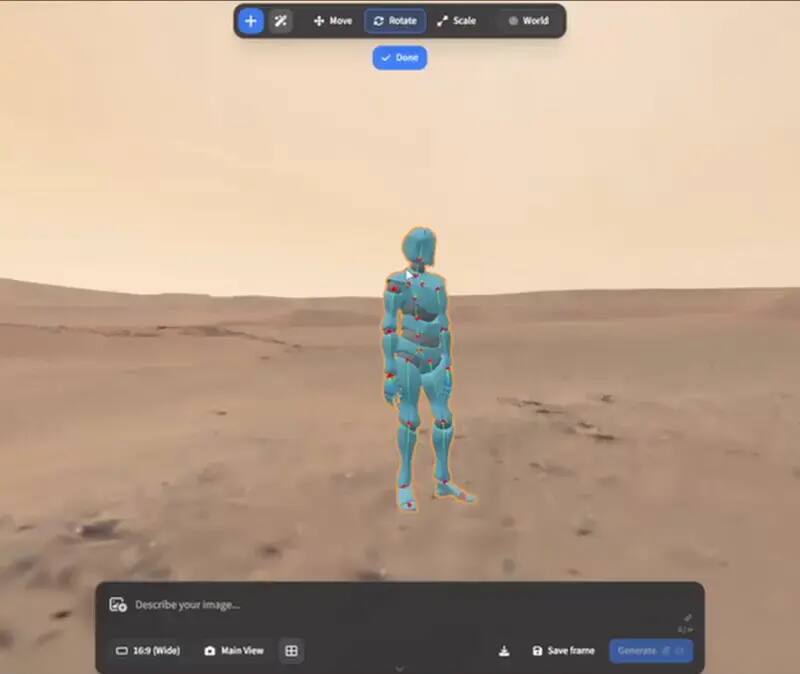
OpenCraftTools does not host ArtCraft and does not proxy the browser session. The online button leaves this site and opens the address published by the official ArtCraft project. Once the tab opens, the upstream application controls sign-in, session storage, file handling, model-provider calls and any usage limits. That distinction matters because a community guide can point to the right door without becoming the operator behind it.
| Question | Official browser entry | ArtCraft v0.41.0 desktop |
|---|---|---|
| Where it opens | app.getartcraft.com | A macOS or Windows release asset from GitHub |
| What this portal verifies | The upstream link exists and is clearly identified | Release tag, assets, licence and platform facts |
| Feature parity | Do not assume every desktop feature is present | Test against the version and machine you install |
| File and privacy boundary | Controlled by the hosted application and its current notice | Controlled by the installed application plus any model provider you connect |
| Best first use | See whether the workflow fits before installing | Build a repeatable project workflow and record the release |
Use the OpenCraftTools launch button or type app.getartcraft.com yourself. Check the address bar before opening a file or entering an account.
Confirm whether the session needs an account, where files are handled and which model services are called. These details can change independently of this guide.
Use a sample image or a copy of a project first. Do not assume a hosted browser surface has the same local-only boundary as a self-hosted WebAssembly build.
If you need a pinned release, repeatable local files or a feature that is only available in the installed build, download the v0.41.0 desktop release and record the asset you tested.
“Online” is often used as if it means free, private, accountless and identical to desktop. It means none of those things by itself. A browser entry can be convenient while still having a separate service boundary; a local WebAssembly archive can run in a browser while being self-hosted; and a desktop binary can still call a model provider when you choose a generation step. A useful answer names the architecture instead of attaching a promise to the word online.
A successful page load proves only that the published entry can be reached in your current browser. It does not prove that an import will preserve every layer, that a model call will be available in your region, that a session will remain signed in, or that a project can be reopened from the desktop release. Keep those questions separate. First test the entry with a small disposable asset. Then test the exact file, feature and export that matter to your job. If the browser surface gives you a useful result, save the output and note the date, browser, operating system and upstream release information shown in the application. That record is more reliable than a generic “works online” badge.
Teams should write down four boundaries before making the browser entry part of a shared process. Record who owns the external account, whether the source asset is allowed to leave the workstation, which provider is called during generation, and where the resulting project can be reopened. Also record the fallback: the ArtCraft desktop release, PhotoCraft for local layered finishing, or another established application. This is not bureaucracy for its own sake. A browser service can change independently of a pinned desktop tag, and the recovery plan is part of the creative workflow whenever a client file or paid generation is involved.
The official ArtCraft site links to app.getartcraft.com as a browser entry. Availability and feature behavior belong to that upstream application and can differ from the desktop release.
Do not assume exact parity. The desktop release is a versioned macOS and Windows asset; the browser entry is a separate upstream surface whose current capabilities should be checked when opened.
No. OpenCraftTools only documents the project and sends you to the upstream address after an explicit click. The portal does not receive the external session, files or tokens.
Only after reading the current upstream privacy and file-handling notice. This portal stores nothing, but it cannot guarantee the behavior of an external hosted application.
For desktop instructions, cite the exact release tag, currently ArtCraft v0.41.0 in this fact card. For the browser entry, record the access date and the upstream page because it is not a desktop asset tag.