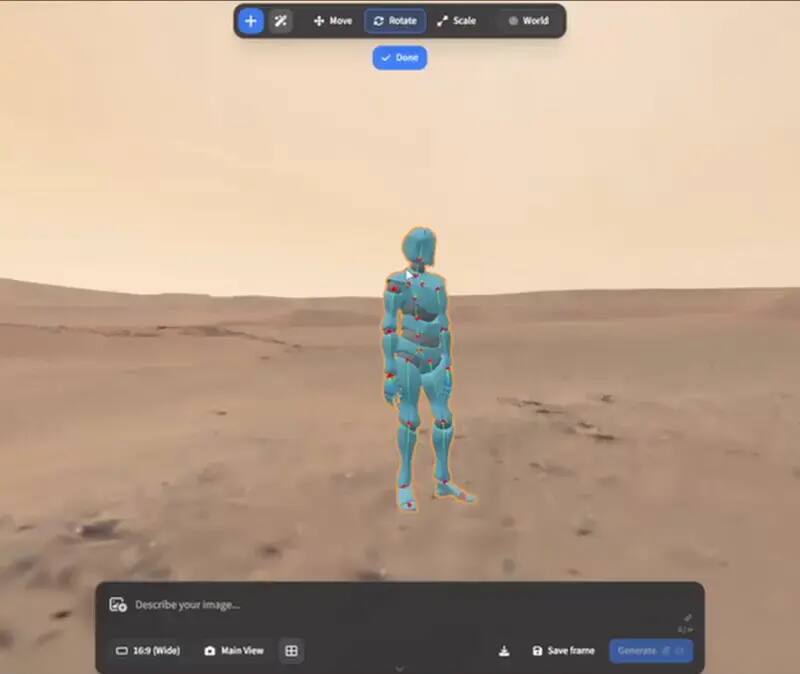
ArtCraft and PhotoCraft are related open-source tools, but they are not interchangeable. ArtCraft is the directing and generation side: composites, scenes, poses, image-to-3D and image-to-video. PhotoCraft is the local editing side: layers, masks, adjustment layers, PSD/PSB, GPU compositing and CLI/MCP automation. Whether you search “ArtCraft PhotoCraft” or “PhotoCraft ArtCraft”, the practical answer is to choose by the stage of the job.
Upstream ArtCraft character-posing preview; availability and model behaviour remain version-dependent. View the GitHub asset
The one-line answer
Use ArtCraft when the problem is directing an image or clip: what is in the shot, where it sits, how a camera moves and which model provider generates the next result. Use PhotoCraft when the problem is editing the pixels and the document: masks, layers, colour, type, PSD handoff or a repeatable batch operation. A real workflow can use both. ArtCraft gets a rough or generated shot into shape; PhotoCraft makes the deliverable editable and repeatable.
Side-by-side workflow differences
Checked differences
Aspect
ArtCraft v0.41.0
PhotoCraft v0.9.0
Choose by
Primary job
AI image and video direction, compositing and scene work
Layered raster editing and document finishing
Whether the next step is generation or editing
Core objects
2D composites, 3D scene layout, poses, references and model steps
Layers, masks, adjustment layers, text, vectors and brushes
The object you need to keep editable
Generation
Calls model providers for selected steps
No generative AI inside the editor
Whether a provider account and run cost are acceptable
PSD/PSB
Not the centre of the documented workflow
Working format with read/write and compatibility tests
Layered file handoff
Motion
Image-to-video workflow is a core use case
Photo editor; no claim of video generation
A still or a moving shot
Automation
Workflow and model selection across creative steps
CLI, JSON actions and MCP for editing/batch work
Directing a shot or processing a folder
Current desktop reach
macOS and Windows release assets
Linux, Windows, macOS and FreeBSD releases plus WebAssembly
The machine that must run the app
Licence
MIT or Apache-2.0
MIT or Apache-2.0
Read the upstream licence and asset notices
ArtCraft is the directing layer
ArtCraft starts where a prompt-only workflow becomes too vague. A generated shot is easier to control when you can place elements, set depth, direct a pose and choose the model for a particular step. The local work is the planning and composition around the generation request. Once a model call happens, an account, network connection and provider pricing enter the picture. This distinction matters when estimating a job: arranging a plate is not the same cost as rendering a video, and an engine that organises the work is not the provider that supplies the model.
PhotoCraft is the finishing and document layer
PhotoCraft begins with pixels or an existing layered file. Its value is the document that remains editable after the creative decision: a mask instead of an erased edge, an adjustment layer instead of a baked grade, and a PSD that can be opened, changed and saved again. It also has the automation surface that ArtCraft does not claim as its centre: run one operation from the CLI, describe a sequence in JSON and expose the editor to an MCP client. That makes it a useful final stage for generated stills, product images and batch exports.
The platforms are not symmetrical
ArtCraft currently publishes macOS and Windows desktop assets and also exposes an official browser entry, while PhotoCraft publishes a wider local editing matrix and a WebAssembly build. Those browser surfaces are not automatically equivalent: PhotoCraft documents a self-hostable WebAssembly build, while ArtCraft points users to its upstream web application. Write the platform and privacy boundary into the workflow before a team chooses a standard, especially when an unattended pipeline is involved.
A practical two-tool workflow
Build the reference, layout and camera idea in ArtCraft before spending on a long generation.
Generate a short still-to-video result with the provider and model that fit the shot.
Open the still or extracted frame in PhotoCraft and keep masks, grades, type and brand elements as editable layers.
Export a delivery copy and keep the native project plus the release versions used for both steps.
Batch repeatable finishing operations through PhotoCraft only after testing one file against the source reference.
Which one should you start with?
Start with ArtCraft if your search begins with AI image generation, image-to-video, camera direction or scene control. Start with PhotoCraft if it begins with Photoshop-shaped layers, PSD, masks, local privacy, Linux editing or batch automation. If the goal is simply to explore the ecosystem, open the product pages in sequence: ArtCraft explains the shot, PhotoCraft explains the file, and VectorCraft covers the vector assets that often surround both.
What neither page should promise
Neither tool should be marketed as a universal replacement for every mature commercial application. ArtCraft depends on the selected model provider for generated output. PhotoCraft is early alpha and does not include generative AI or full plugin compatibility. Both are moving open-source projects, so save the release tag with important work and repeat a file-based test after an upgrade.
Who this is for
Choosing the right Craft app for a first task
Moving a generated still into an editable PSD workflow
Planning an image-to-video and finishing pipeline
Separating local editing from provider costs
Combining raster and vector assets in a creative project
Limits worth knowing
Both projects are moving releases; this page names the builds checked on 2026-10-14.
ArtCraft output depends on the model provider and model selected for each step.
PhotoCraft is early alpha and does not promise Photoshop plugin or professional workflow parity.
This comparison identifies workflow fit and is not an endorsement by either upstream project.
The questions people ask before choosing
01
Are ArtCraft and PhotoCraft the same app?
No. ArtCraft focuses on directing and generating images, video and scenes; PhotoCraft focuses on local layered image editing, PSD and automation. They are complementary tools rather than two names for one editor.
02
Which one is the Photoshop alternative?
PhotoCraft is the closer fit for a Photoshop-shaped layered editing workflow, but it is early alpha and not a full parity replacement. ArtCraft is a different category: an AI scene and image-to-video workflow rather than a pixel editor.
03
Can I use ArtCraft and PhotoCraft together?
Yes. Use ArtCraft to direct or generate a shot, then use PhotoCraft to finish stills, masks, grades, type and PSD handoff. Keep the source and release versions so the workflow can be reproduced.
04
Which one runs on Linux?
PhotoCraft publishes Linux builds and a WebAssembly build. ArtCraft has no Linux desktop asset in the current release, although its official site exposes a separate browser entry; a Linux workflow may still use separate machines for generation and editing.
05
Does PhotoCraft generate images with AI?
No generative AI is included in the editor itself. PhotoCraft edits the pixels you bring; ArtCraft is the project in this pair that organises model-provider generation steps.