ArtCraft image to video: how do you turn one image into a video?
ArtCraft takes a still into motion by keeping the image as the reference and letting you direct the shot: composite the frame in 2D, place it in a scene for depth, set pose and camera, then hand the step to a model and review the take. Here is that sequence, with the cost and account realities stated rather than glossed over.
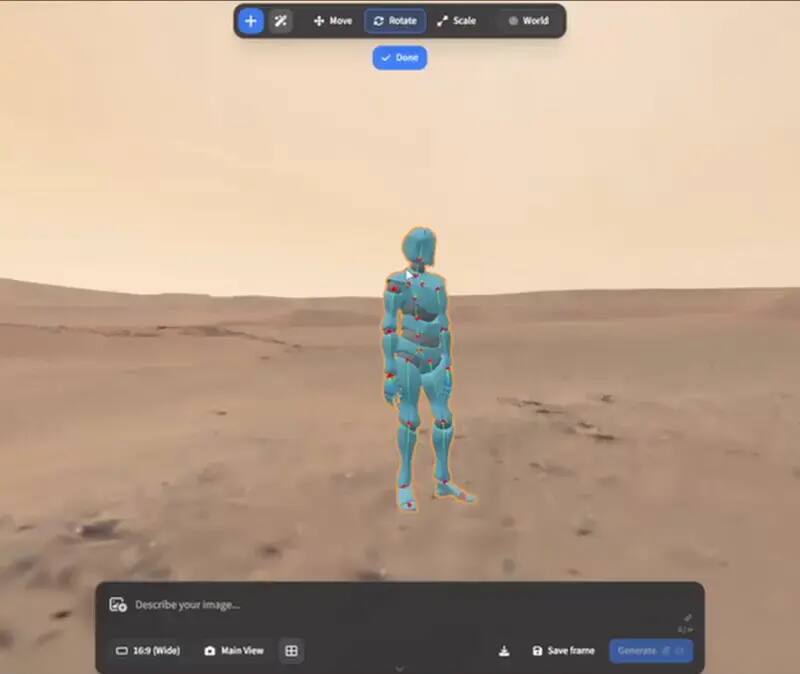
Upstream ArtCraft character-posing preview; availability and model behaviour remain version-dependent. View the GitHub asset
Start with what you actually have
Image-to-video rewards preparation more than prompting. A still with a clear subject, readable depth and no ambiguous edges gives a model something to move. A cluttered frame gives it something to guess at. Before opening the app, decide the one thing that should change: a camera move, a subject action, a lighting shift. Shots that ask for two of those at once usually read as a mistake.
The workflow in ArtCraft
Build the 2D composite
Bring the still into the compositor and fix what will not survive motion: patches, edges, an unwanted reflection. Work you skip here shows up multiplied in every frame of the result.
Move into scene layout
Placing the element in a 3D scene gives you camera and depth to direct. This is where a flat image becomes a shot, because you can decide where the viewer is standing rather than accepting the framing the generation gave you.
Set pose and framing
Character pose direction exists precisely so that you are not hoping a text prompt lands the composition. Set the pose you want, then check the silhouette at the resolution you will render.
Choose the model for this step
Multi-model selection is the practical part of the engine: different models are good at different things, and the unit of work is the step rather than a single vendor relationship. Pick for the shot, not for brand loyalty.
Request the move
Run the image-to-video step with the composite as reference. Short first: a two-second take that is right beats an eight-second take that is almost.
Review as a clip, not a still
Play it once at full size before deciding. Frames you would never notice in a still become obvious in motion, especially around hands, hair and text in the background.
What costs money here
Where the money goes
Step
Runs where
Cost behaviour
2D compositing and cleanup
Local
No per-run cost
Scene layout and camera
Local
No per-run cost
Generation of stills
Model provider
Charged per image by your provider
Image to video
Model provider
Charged per second or per clip, the most expensive step
Finishing edit
PhotoCraft, local
No per-run cost
The cheap step is the one people skip: fixing the reference still before generation costs nothing locally, while re-running a video step to fix the same problem costs real money and takes real minutes.
Finish it like an editor, not a prompt
Export the clip and bring it into PhotoCraft for the parts a generation model is reliably bad at: keeping a logo legible, holding a colour grade across the shot, masking out a warped background, and cutting the last frames where motion usually falls apart. This is where the two tools genuinely fit together, and it is the reason this portal documents both rather than one.
Failure modes worth planning for
The subject drifts into a different face halfway through. Shorten the clip or hold the pose more firmly in the scene step.
Background detail swims. It is reading depth incorrectly; simplify the still before generating.
Text in frame melts. Remove it from the source and add it back as a layer afterwards.
Motion is smooth but wrong. That is a direction problem, not a model problem — re-set the camera.
The clip is excellent for six frames. Cut to those six; a short clean shot beats a long salvage job.
Platform reality
The current ArtCraft release ships macOS and Windows installers only. There is no Linux build in the published assets, which means a Linux-based workflow today uses PhotoCraft locally and reaches for ArtCraft on the machine that can run it.
The cheapest habit in this workflow is also the least popular: look at the first three frames before you look at the whole clip. Motion failures show up immediately as a silhouette that changes shape or an edge that swims, and catching that at frame three costs one retry instead of the seconds and credits a full render would have spent.
Keep a small reference sheet for recurring shots: the still you started from, the scene layout, the camera setting and the model you chose. When the client asks for a variation two weeks later, that sheet is the difference between a five-minute repeat and a fresh exploration at full price.
Write the shot list before the session rather than after it. One line per shot with the source still, the movement you want and the model you intend to use turns an open-ended exploration into a bounded task, and it makes the cost of an afternoon predictable enough to approve in advance instead of explaining afterwards.
Who this is for
Animating a poster still into a short social clip
Testing a camera move before committing to a long generation
Keeping a character consistent across several shots
Turning client-approved stills into motion without a new shoot
Limits worth knowing
Generation runs through model providers: accounts, network and per-run cost are part of the workflow.
Output quality is a property of the model you select, not of ArtCraft itself.
No Linux desktop installer in the current release; the official browser entry is a separate upstream surface and should not be treated as desktop parity.
Longer clips degrade: plan for short takes and assemble rather than expecting one continuous generation.
Questions this guide gets asked
01
How much does an image-to-video clip cost to make?
That depends entirely on the provider you connect, because the application itself is free and open source. What you control is the number of paid retries, and cleaning the plate plus directing the camera locally first is the cheapest way to reduce them.
02
Why does my clip drift away from the source still?
Usually because the reference is ambiguous: overlapping edges, unreadable depth or a subject with no clear silhouette. Fix the still in the composite step and the motion step then has something concrete to follow.
03
Can I run this on Linux?
There is no Linux desktop asset in the current release. The official project also exposes a browser entry, but its feature and hardware behavior is a separate upstream surface; the usual Linux workflow pairs PhotoCraft locally with ArtCraft on a machine that can host the desktop release.
04
How long should the first clip be?
Short. A two-second take that is right beats an eight-second take that is almost, because failures in a longer generation accumulate and you end up cutting the result back to its first second anyway.
05
Which model should I choose?
Choose per shot rather than per brand. Some models hold identity better and some move more plausibly, and since the engine treats the model as a parameter of the step, testing two on the same reference is a workflow rather than indecision.