Open-source Photoshop alternative: ArtCraft, PhotoCraft vs Photoshop — which fits?
PhotoCraft is the open-source Photoshop alternative in this comparison, while ArtCraft is the adjacent AI image and video workflow in the same search. Both open layered PSD files, but Photoshop owns the format and has decades of depth behind it. PhotoCraft is an early-alpha Rust editor that runs where Photoshop does not, including Linux and FreeBSD, costs nothing to install and can be driven from a command line. This page compares fidelity, platforms, automation, generative features and cost before a workflow change.
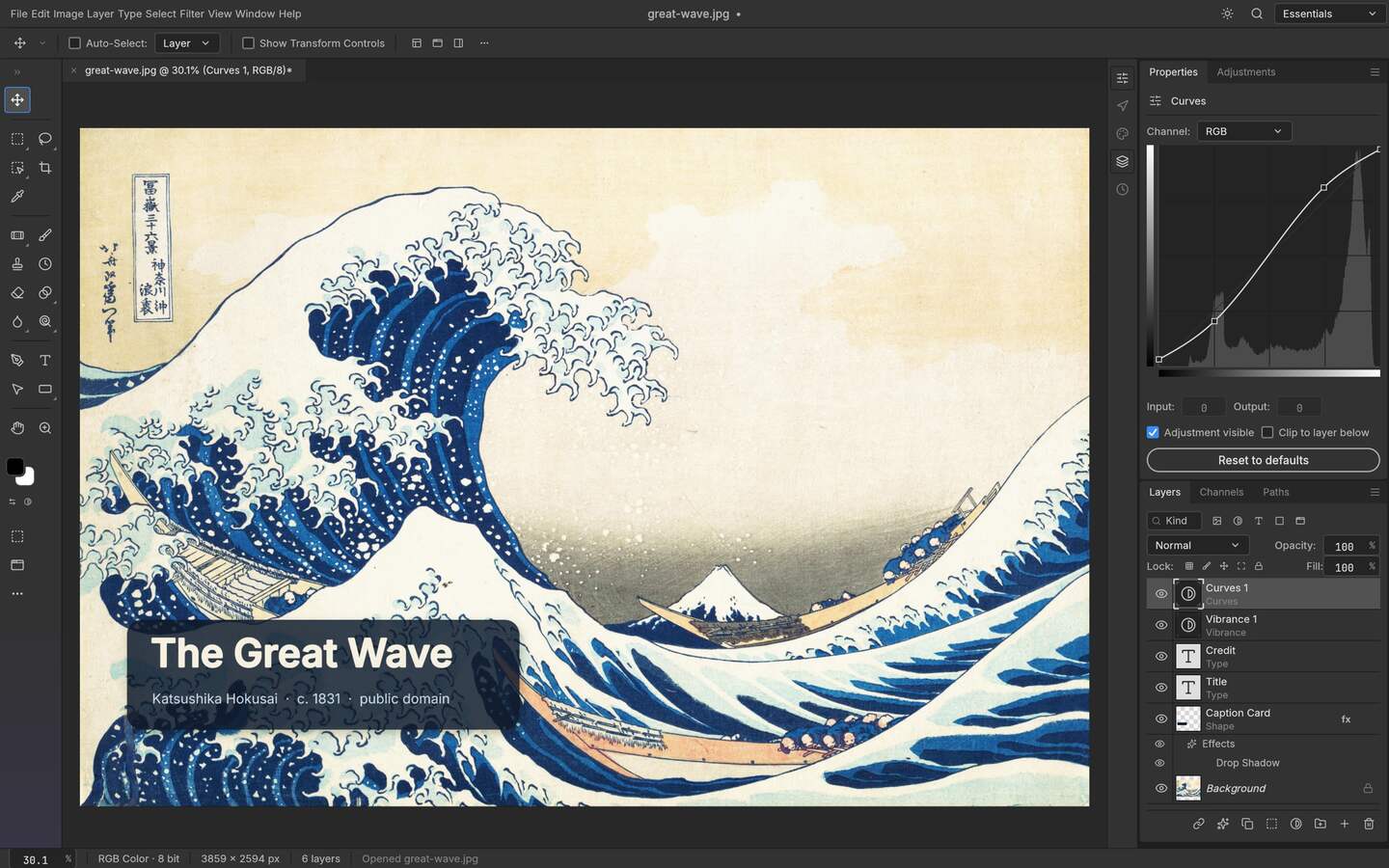
Upstream PhotoCraft interface preview; the artwork shown in the repository is public-domain source material. View the GitHub asset
The short answer
If your work depends on Adobe's ecosystem — its plugins, its colour pipeline, generative features, or a document that has to behave identically in a studio where Photoshop is the house tool — Photoshop is the right instrument and there is no honest argument otherwise. If the job is layered PSD editing on a machine where Photoshop cannot be installed, or a batch of files you want graded by a script rather than by hand, PhotoCraft does that specific work without an account, a subscription or a mirror of your files on anyone's server.
The comparison, category by category
Checked differences, both sides dated 2026-10-13
Aspect
PhotoCraft v0.9.0
Adobe Photoshop
How to verify
Licence
MIT or Apache-2.0, open source
Commercial subscription software
The LICENSE file in the repository; Adobe's own product pages
Cost to run
No account, no licence key, no seat fee
Subscription through Adobe, per Adobe's terms
Adobe product page and pricing page
Desktop platforms
Linux (x86_64, aarch64, riscv64), Windows, macOS, FreeBSD
Windows and macOS in Adobe's desktop technical requirements
GitHub release assets; the helpx technical requirements page
Browser option
WebAssembly build of the same core, served by you
Adobe offers browser-based editing of Photoshop files on its own terms
The web archive in the release; Adobe's documentation
PSD fidelity
Reads and writes layered PSD as its working format, with a compatibility test suite in the repo
The format originates here, so behaviour is authoritative
Open, save, reopen; compare against a flattened reference
The same vocabulary plus decades of accumulated depth
Both projects' own documentation
Generative AI
None inside the editor
Adobe ships generative features in the application
Adobe's feature documentation
Automation
CLI, JSON action files, MCP server
UXP scripting and Photoshop APIs documented by Adobe
Command tools in the release; developer.adobe.com Photoshop page
Plugin ecosystem
No Photoshop filter or plugin compatibility
Long-established third-party ecosystem
Try a filter you depend on; that test is decisive
Maturity
Early alpha; panels still move
A mature release line
Each project's own release history
Where Photoshop is ahead, stated plainly
It owns the format. That is not a marketing line, it is the reason a file with nested objects, unusual blend modes or effects written by a design tool tends to behave predictably there and nowhere else. Its colour management, soft-proofing and print path are finished features rather than road-map items. Its plugin and actions ecosystem means a specialist step somebody invented in 2009 probably still works today. And its generative features are integrated at a depth an editor that deliberately contains no model cannot match, because that editor made a different choice.
Adobe also automates. It would be easy and wrong to write a comparison that says only PhotoCraft can be scripted: Photoshop has UXP scripting and hosted APIs described on Adobe's developer pages. The difference is shape, not existence. PhotoCraft exposes the whole editor as a command surface designed to run headless against a directory with no account in the loop, and it speaks MCP, which is the protocol agents use now. Adobe's automation runs inside a licensed, account-bound application, which is a different constraint even when the capability is real.
Where PhotoCraft is ahead
Three things, and only three. It installs on Linux and FreeBSD, which settles a whole class of workstation and CI questions that Adobe simply does not answer. Its licence lets you read the code, build it yourself and ship it inside an environment where a per-seat subscription is impossible to justify. And because the same Rust core compiles to a desktop binary and a WebAssembly bundle, you can run it offline with your files never leaving the machine, then serve the identical engine to a browser context without maintaining a second implementation.
The batch surface deserves repeating because it is where people actually save time: one JSON action file applied to a folder, and the same file callable by an agent over MCP. A five-hundred-file delivery does not become five hundred manual sessions.
Decide by scenario
Which one fits
Scenario
Choose
Because
A studio standardised on Adobe licences and plugins
Photoshop
Behaviour, ecosystem and handoff are already settled
Layered PSD work on a Linux workstation
PhotoCraft
There is no Linux desktop release of the commercial tool to install
Batch grading hundreds of files from one definition
PhotoCraft
Action files and a headless CLI are the design intent
Print, soft-proofing or a specialist colour path
Photoshop
A finished print pipeline is not something an alpha editor offers
Nested smart objects and heavy layer effects
Photoshop
The format was invented there, so fidelity is authoritative
An editor an agent must drive unattended
PhotoCraft
No account, no seat licence, and it speaks MCP
A client who will reopen your file in their own Adobe install
Either, then verify
The test is the round trip, not the feature list
Test before you switch, not after
Take five real files, not a toy file
Pick the ugliest layered documents in your archive: nested groups, layer styles, text on a missing font, 16-bit where you have it. A comparison on a clean file tells you nothing.
Open and count
In PhotoCraft, note the layer count, group nesting and which text layers survived as text. Anything that arrived as pixels is a limit you now know about in advance.
Edit, save, reopen
Change one mask, add one adjustment layer, save as PSD and reopen it. Then open the same saved file in a Photoshop install to see what survived the handoff in the other direction.
Compare flat outputs
Export the same composite from both and look at them side by side at output size. Blend-heavy stacks and effects are where differences show, not at thumbnail scale.
Script one job
If automation is your reason for reading this page, run one action file over a ten-file sample with the input directory read-only. That single test tells you whether the workflow is real.
The caveat that matters
This is not a claim that one tool beats the other, and a table that implied so would be worthless. It is a claim about scope: PhotoCraft was built to keep layered documents editable, run on platforms the market leader ignores and be operated from a command line, and it is doing that while describing itself as early alpha. Photoshop is a deeper, broader, finished product inside Adobe's licensing model. Choosing the alpha tool for the two or three things it genuinely solves is a reasonable trade; choosing it because a page like this one said so would not be.
Who this is for
A designer on Linux deciding whether an alpha editor can carry client PSD work
A studio asking what fraction of its Photoshop hours are actually layer editing
An operations team that wants repetitive grading scripted instead of licensed per seat
Anyone checking whether a handoff file will survive leaving the Adobe ecosystem
Limits worth knowing
The Photoshop column describes categories Adobe documents; version numbers, prices and feature names must be read from Adobe's own pages, which refuse automated fetching.
Neither side was benchmarked for speed here; nothing on this page is a performance claim.
Photoshop, Adobe and their logos are trademarks of Adobe; the names appear to identify products only, and this page claims no affiliation or endorsement.
Fidelity statements about PSD round-tripping are testable by you in about twenty minutes, and the answer can vary with your specific files.
The questions people ask before choosing
01
Can PhotoCraft replace Photoshop?
Not as a general statement, and this portal will not write that it can. It covers a specific slice of Photoshop work — layered PSD editing without an account, on Linux or FreeBSD, or driven from a script — and layer styles, print workflows and plugin-dependent steps are exactly where it is still thin.
02
Will a file I save in PhotoCraft open correctly in Photoshop?
Layers, groups, masks, adjustment layers and text are what the project is built to preserve, so the honest test is your own file set: save in PhotoCraft, reopen in a Photoshop install, and see what came back. Do that before a deadline, not after.
03
Does Photoshop run on Linux?
Adobe's desktop technical requirements cover Windows and macOS, so there is no supported Linux desktop build to install. Workarounds that run the Windows build inside an emulator exist but are not an Adobe-supported path, and they are a different question from this comparison.
04
Is PhotoCraft free for commercial work?
It is published under MIT or Apache-2.0, which permits commercial use under the chosen licence terms. There is no seat fee or activation server in the project itself. Redistribution of modified builds still carries the obligations written in the selected licence, so read the file rather than this sentence.
05
Which should a beginner learn first?
Learn the layer model, not the product: stacking, masks, adjustment layers and non-destructive intent transfer between editors and are the part that stays useful. If the job is a Photoshop file you must hand back to somebody with an Adobe licence, learn inside Photoshop.