ArtCraft open PSD file on Linux: how do you edit and save it?
PhotoCraft reads and writes PSD and PSB, which can make it useful on Linux for files that arrive from a Photoshop workflow; the exact round trip still depends on the document features supported by the release. Open the file, check the layer panel against what the sender described, edit above a copy of the base layer, then save the project before exporting a flat delivery copy.
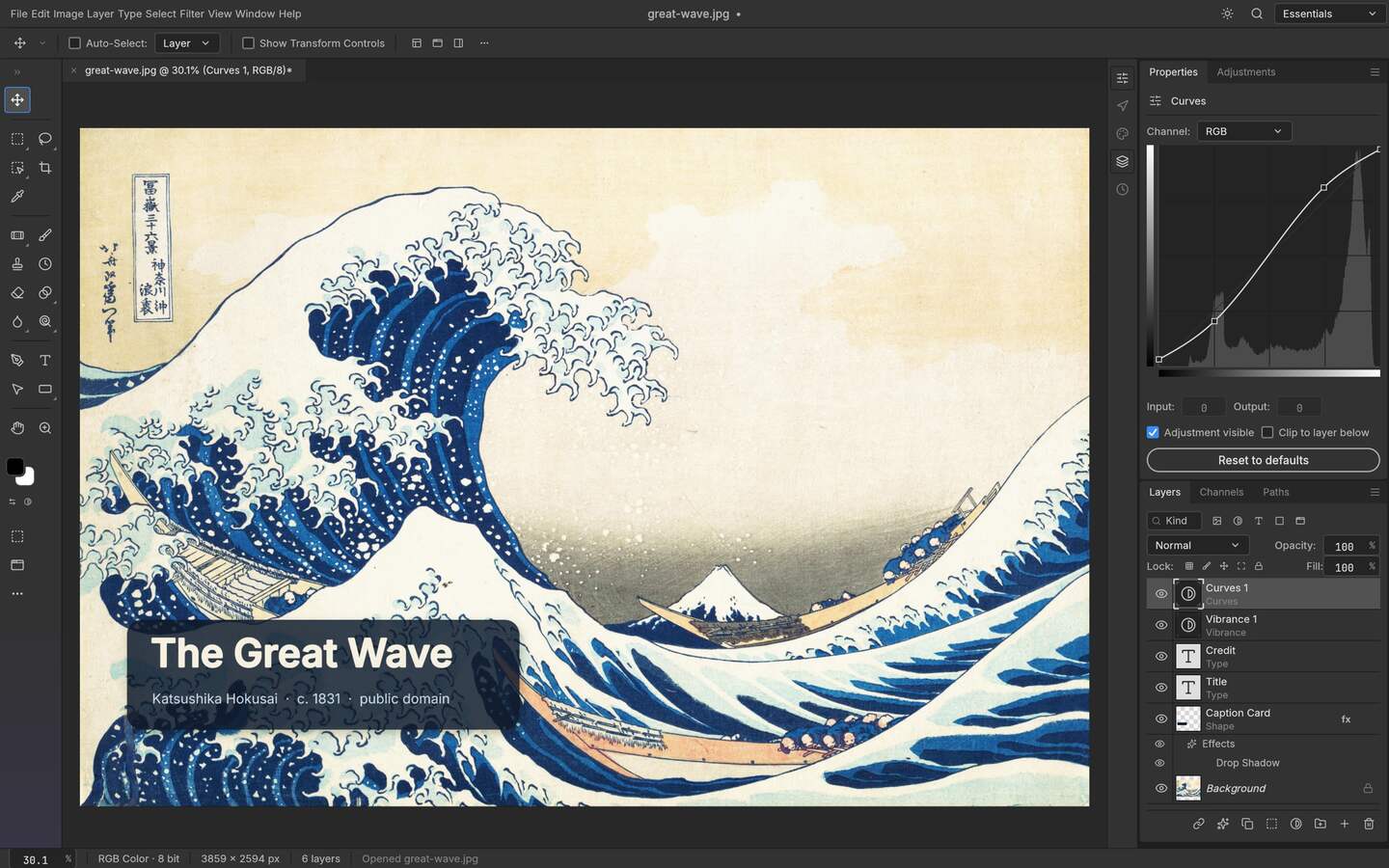
Upstream PhotoCraft interface preview; the artwork shown in the repository is public-domain source material. View the GitHub asset
Why this is the hard part on Linux
Many editors read PSD as a container they can flatten, not as a document they can round-trip. You may get the composite while losing groups or styles that have no equivalent, and hand back a file your colleague can no longer edit. The question is therefore not only "can it open" but "what survives when it comes back". PhotoCraft treats PSD as a working format and the repository publishes a compatibility test suite, but the current release still needs to be checked against the structures in your file.
Pre-flight the file before you edit
Record what the sender intended
Ask for a flattened reference PNG. You now have something to compare against when a difference turns up, and you can tell whether the change you see is your edit or an interpretation gap.
Open and count
Note the layer count, group nesting and whether text layers survived as text. If text arrives as raster, you can still edit the composite but you cannot retype it.
Check masks and adjustment layers
Toggle each one. A mask that is present but misread will show as a hard edge rather than a feather.
Inspect effects separately
Drop shadows, strokes and blends are the features most likely to fall back to something approximate. Judge them at output zoom, not at 100 percent on your monitor.
Save a baseline copy first
Before any edit, save an untouched copy under a different name. That is the file you reopen if the session goes wrong.
What survives the round trip
Structure fidelity
Element
On open
On save
Notes
Layer tree and groups
Preserved
Preserved
Naming survives, which matters for handoff back
Layer masks
Preserved
Preserved
Check feather radius visually on complex edges
Adjustment layers
Preserved
Preserved
The core reason to keep working in the project rather than flattening
Text layers
Preserved where the font is available
Preserved
Missing fonts substitute; re-check kerning after opening
Vector shapes
Preserved
Preserved
Complex path operations may differ from another engine
Layer styles
Approximate for some effects
Approximate
Treat as a decision to verify against the reference export
Smart objects
Limited
Limited
Plan a flattened fallback rather than assuming nested files survive
Editing without destroying the handoff
Work above the incoming layers rather than inside them. Duplicate the base layer once, hide the original rather than deleting it, and put every change in a named group so the person who opens the file after you can see the structure of your intent. When you need to compare, toggle the group rather than stepping backwards through history — history is a session feature; groups are a document feature that travels with the file.
Saving and delivering
Save the project
Write the layered document first. This is the version that can still be edited.
Flatten a copy for delivery
Export PNG or JPEG from a flattened duplicate, never from the project you intend to keep working on.
Compare against the reference
Put your export next to the sender's flattened PNG. Differences you did not introduce are interpretation gaps, and it is worth knowing which ones.
Archive both files
Project plus export, under the same name. Six weeks later, that pairing is the only thing that explains the file.
Where PSD work still goes wrong
Nested smart objects from a design tool: expect a flattened fallback plan.
Type set with a font you do not have: substitution changes line breaks, and a translated page can stop fitting.
Blend modes stacked in groups: the composite can look right at preview zoom and differ at output.
16-bit files: check whether your export target supports the depth before you start.
A realistic rule
Treat PSD round-tripping on Linux as solved for structure and unsettled for effects. Layers, masks, adjustment layers, text and shapes are what make this workflow possible at all; layer styles and nested objects are where you still verify against a reference image before committing a deadline to it.
One habit saves more grief than any setting: name the version in the filename of anything you hand back. A file called logo_final_v082.psd tells the next person which build produced it, and when a difference turns up later, that one string is the difference between a reproducible question and a mystery. It protects you too, because a bug report that names the build gets answered faster than one that says the latest version.
Who this is for
Taking client PSD work onto a Linux workstation without a Windows VM
Editing a design file that must come back as a layered document
Retouching a batch where masks and adjustment layers stay reversible
Keeping an archive of editable projects alongside flat exports
Limits worth knowing
Some layer styles are interpreted approximately rather than identically to another engine.
Smart object nesting is limited, so plan a flattened fallback for files that rely on it.
The format test suite in the repository covers a lot, but no project claims every production PSD from every design tool.
Questions this guide gets asked
01
Can PhotoCraft really save a PSD that another editor can reopen?
Yes, that is its central design goal: the layered document is the working format rather than an import. Verify it with your own files, because layer styles and nested smart objects are the two areas where interpretation still differs.
02
What happens to my text layers when a font is missing?
The editor substitutes, which usually changes line breaks and sometimes kerning. Re-read any text-heavy layout after opening, and install the fonts the file expects before you trust a delivery export.
03
Is 16-bit or print-oriented colour work safe here?
Check your output target before starting rather than after. Bit depth and pre-press profiles are exactly where an alpha editor and a commercial print pipeline disagree, and the disagreement surfaces at delivery time.
04
Should I flatten before saving?
Never as your only copy. Save the layered project first, then export a flat delivery file from a duplicate. That order is what keeps a revision request from turning into a complete redo.
05
How do I test whether one of my files survives?
Open it, save it, reopen the saved file and compare against a flattened reference from the sender. Three checks and one image, and you know precisely which elements did not come back.