ArtCraft, PhotoCraft vs GIMP: which one fits a layered workflow?
GIMP is a mature, decade-tested editor whose document model is its own; PhotoCraft is an alpha Rust editor whose organising bet is that layered PSD should round-trip. Both run on Linux. The choice is mostly about whether your files must survive as PSD and whether you want a command-driven pipeline.
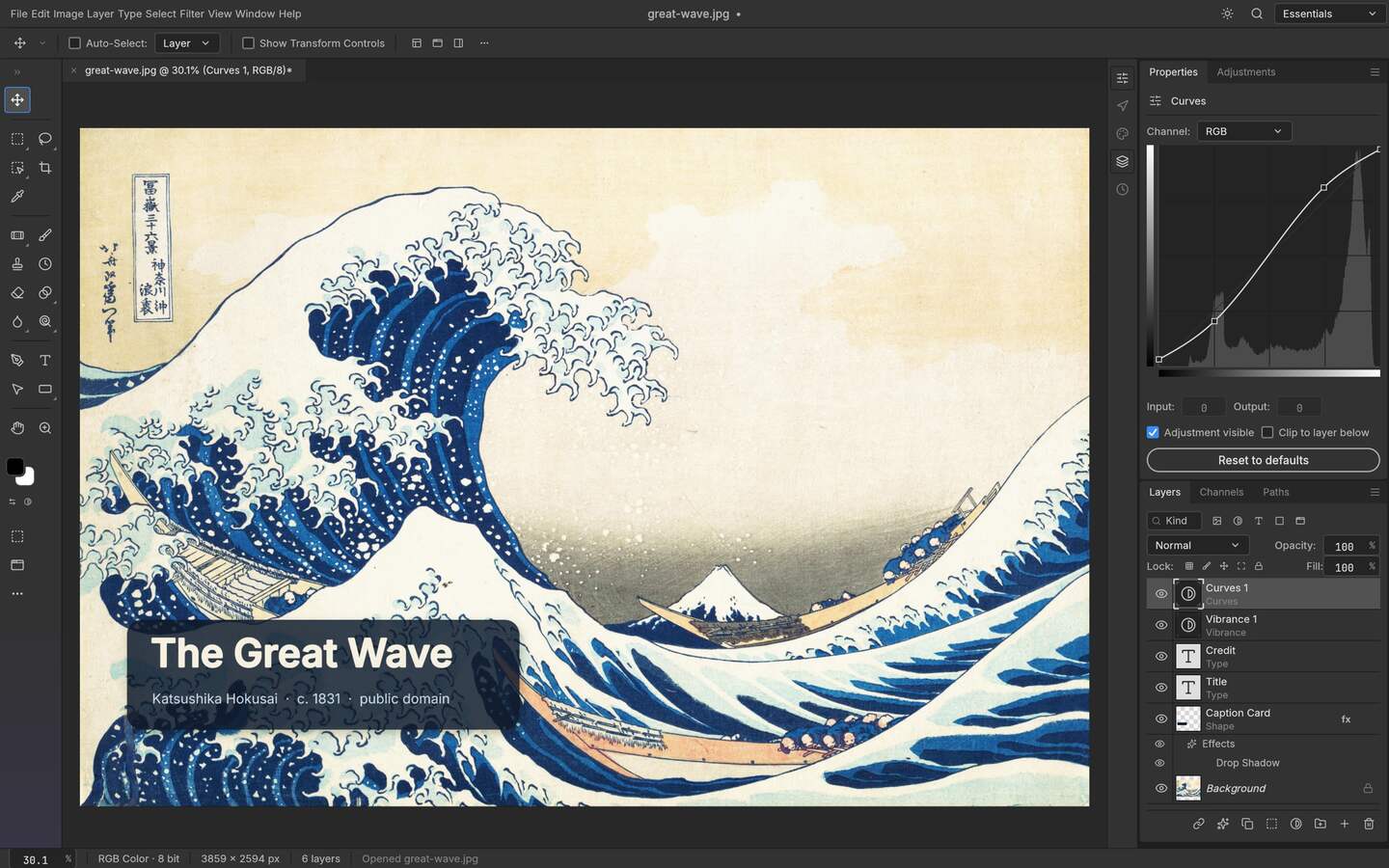
Upstream PhotoCraft interface preview; the artwork shown in the repository is public-domain source material. View the GitHub asset
One-line answer
If the deliverable is a layered PSD that another person must reopen in a commercial editor, PhotoCraft is the tool designed for that job. If you want the broadest set of mature features on any hardware with a large plugin and script ecosystem, GIMP has years of reach that an alpha project cannot match yet. Neither statement is a score.
The comparison, build to build
Checked differences
Aspect
PhotoCraft v0.9.0
GIMP
How to verify
Document model
Layer-first, PSD as a working format
Own native format; PSD imported and exported
Open a layered PSD, edit, save, reopen in a commercial editor
Engine
Pure Rust with Metal, Vulkan, DX12 and WebGPU paths
Mature C codebase with long-standing raster pipeline
Platform notes in each project repository
Maturity
Early alpha, panels change
Stable release line, long support cycle
Release history on each project
Scripting
CLI, JSON action files, MCP server
Script-Fu and Python bindings with a long history
Command surface in each build
Platforms
Linux, Windows, macOS, FreeBSD, WebAssembly build
Linux, Windows, macOS
Published release assets
Licence
MIT or Apache-2.0
GNU General Public License
LICENSE file in each repository
Cost
Free, local
Free, local
Both projects' own distribution
Where PhotoCraft is ahead
Layered PSD is the difference that changes a workflow. In GIMP a PSD arrives as something to interpret: layers survive import more often than they survive the round trip, and text styles, effects and nested structures get translated into GIMP's own model on the way in and translated again on the way out. PhotoCraft treats the layered document as the thing it is editing rather than as an import, which is the whole reason a designer on Linux would consider an alpha editor over a mature one. The modern GPU rendering paths and an agent-facing MCP server point the same way: an engine built now, on the assumptions of now.
Where GIMP is ahead
Mature breadth is not a feature you can shortcut. GIMP has a stable release line, hardware tolerance for machines without modern GPU drivers, a scripting API that has been used in production for years, image preparation and printing workflows with answers already written for them, and a plugin and file-format surface that no young project matches. It also handles the unglamorous parts: colour management, huge canvases on modest hardware, and a keyboard-driven workflow that people have built muscle memory for. If your job involves a format or a step that PhotoCraft has not reached, GIMP probably has it and has had it for a decade.
Decide by scenario
Which fits
Scenario
Choose
Because
Layered PSD must come back editable
PhotoCraft
The format is the document model, not an import
Old hardware, no modern GPU driver
GIMP
A long support cycle tolerates machines without current drivers
Existing script or plugin you depend on
GIMP
The ecosystem is the feature
Batch work driven by an agent
PhotoCraft
A JSON action file plus MCP is designed for that
Print or pre-press step
GIMP
Mature colour and output workflows already exist
You cannot afford an alpha surprise
GIMP
Stability is a release-line property, not a code-quality verdict
The honest caveat
Comparing a four-month-old release against a decade of stability is a category mistake if it is presented as quality ranking. What you can say precisely: on the specific job of keeping a layered PSD round-trippable, and on driving an editor from a command or an MCP client, PhotoCraft was built for the task and GIMP was not. On everything adjacent to that, maturity carries the day.
A test you can run in twenty minutes beats reading any table. Take one layered file you care about and run four checks in each editor: open it and count the layers; toggle a mask and see whether it was read correctly; save the document and reopen it; export a flat copy and compare against the reference the sender gave you. Those four steps expose the real boundary of an editor far faster than a feature matrix, and they cost one evening rather than a migration mistake.
Record the results as facts about your own files rather than as verdicts about the tools. A note saying that this editor lost a nested object in that particular file is still useful in six months; a claim that it is worse is not, because both the file set and the versions will have moved by then.
One asymmetry is worth naming plainly: a two-decade release line against a project in its first year. That is not a quality score, it is a risk statement, and it should decide where each tool sits in your workflow rather than which one you are allowed to prefer.
Who this is for
Choosing one editor for a team that exchanges PSD files
Deciding whether a Linux workstation can drop a Windows VM
Setting up a batch pipeline where a script must survive an upgrade
Reassessing an alpha tool against a dependable fallback
Limits worth knowing
Both projects change; this page names versions and was checked on the date in its source bar.
Feature claims here are about document model and automation, not benchmark speed.
Product names are trademarks of their respective owners and are used for identification only.
The questions people ask before choosing
01
Is PhotoCraft better than GIMP?
Neither. PhotoCraft is built so a layered PSD survives the round trip and so the editor can be driven from a command; GIMP has two decades of formats, plugins and stability. Which of those you need decides the answer for you.
02
Can I use both on the same project?
Yes, and it is common. The practical split is working in the editor whose document model matches the handoff, and using the mature tool for the specialist step that neither has yet.
03
Which one runs better on old hardware?
GIMP. Its long support cycle tolerates drivers and machines a GPU-first engine assumes away, while PhotoCraft selects Metal, Vulkan, DX12 or WebGPU back ends, making older hardware its weaker case.
04
Do the licences change what I can do commercially?
Both offer commercial-use paths, but the obligations differ: MIT or Apache-2.0 on one side and the GNU General Public License on the other. Read the licence file rather than a summary before redistributing modified code.
05
How should I test this comparison myself?
Open one layered file in each, count the layers, edit a mask, save and reopen, then export a flat copy against the sender reference. Twenty minutes gives you your own answer instead of a borrowed table.