ArtCraft PhotoCraft VectorCraft: how do they fit together?
The three Craft apps solve different stages of a creative job. ArtCraft directs AI imagery, scenes and motion; PhotoCraft finishes pixels and layered PSD work locally; VectorCraft draws paths, shapes and artboards. Treat them as a workflow family, not three names for the same editor, and choose the app by the artifact you need to control next.
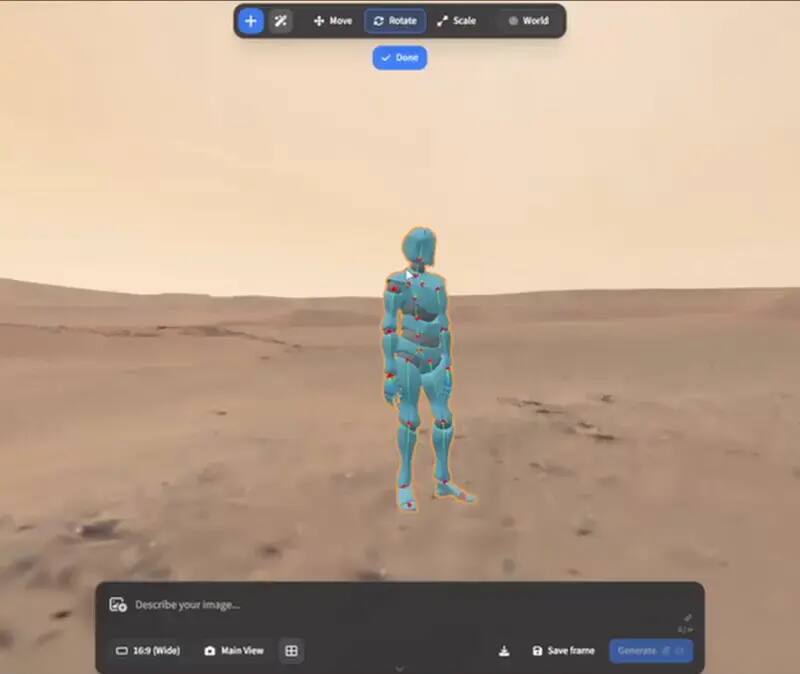
Upstream ArtCraft character-posing preview; availability and model behaviour remain version-dependent. View the GitHub asset
The short decision
Choose by the work in front of you
If you need to…
Start with…
Why
Direct a generated image, scene or short video
ArtCraft
It is built around composition, 2D/3D scene direction, pose and model-provider steps
Retouch pixels, preserve layers or automate image edits
PhotoCraft
It focuses on layers, masks, PSD/PSB, local processing, CLI and MCP
Draw logos, diagrams, icons or vector layouts
VectorCraft
It focuses on paths, shapes, artboards, SVG/PDF and vector automation
What “ecosystem” does and does not mean
The projects share a Crafting Apps context, but OpenCraftTools does not treat that as proof of file compatibility or feature parity. ArtCraft generation can involve networked model providers. PhotoCraft is the local-first raster editor. VectorCraft is the vector editor. Their source, release tags, platform matrices and limitations must be checked per project, and the official browser entry is not a promise that every desktop feature is available in a tab.
A practical handoff workflow
Block the idea in ArtCraft
Use the scene, reference and model controls to decide the composition or motion direction. Keep the upstream release and provider boundary visible.
Finish raster work in PhotoCraft
Use layers, masks and adjustment layers for cleanup, colour work and PSD handoff. Keep the editable source before exporting a flat delivery image.
Build reusable vector assets in VectorCraft
Use paths, artboards and SVG/PDF export for logos, icons and diagrams. Test fonts, linked assets and PDF-compatible AI files with the real handoff.
Automate only the repeatable boundary
PhotoCraft and VectorCraft document CLI/JSON/MCP surfaces. ArtCraft workflows may depend on model providers, so pin the step, account and cost before batching it.
Platform and privacy boundaries
PhotoCraft and VectorCraft offer local desktop workflows with browser builds documented upstream; ArtCraft has macOS and Windows desktop assets plus an official online entry. “Browser” can mean a local WebAssembly build or a hosted application, so check the actual address and file boundary before putting private material into a tab. OpenCraftTools links to upstream releases and does not host binaries, proxy sessions or receive project files.
A safe evaluation order
Pick one real but disposable job, not a feature checklist.
Record the exact release, operating system, file format and external provider used.
Test import, edit, save and export before moving a production file.
Keep a mature fallback when the project is alpha or the format is business-critical.
Where the handoffs become real
A family page is useful only if it follows an artifact through the tools. Imagine a poster: ArtCraft can help establish the subject, reference and motion direction; PhotoCraft can clean the raster layers, masks and colour; VectorCraft can create the logo, icon or diagram that must stay sharp at multiple sizes. Those are separate jobs with separate failure modes. A browser link may be hosted while a WebAssembly archive may be local, and a model-provider step may send a prompt or source image outside the machine. The correct handoff therefore includes the file format, the location of processing and the exact release, not only the product name.
How to choose without chasing feature lists
Start from the next decision you need to make. If you need to control camera, pose or image-to-video, inspect ArtCraft. If you need to preserve editable pixels and layers, inspect PhotoCraft. If you need paths, artboards and vector export, inspect VectorCraft. Then ask a second question: is this a local, hosted or provider-backed step? That answer changes privacy, account, cost and repeatability. A tool can be open source while one part of its workflow still depends on a network service. Naming that dependency is more useful than calling the entire ecosystem free or private.
What to record for a repeatable workflow
The product and exact release tag used for each step.
The input and output format, including whether layers, fonts and links survived.
The operating system, browser or desktop surface and any GPU driver that affected the result.
The model provider, account and network boundary for an ArtCraft generation step.
The fallback application that can reopen the source if an alpha build changes.
Why the family page stays independent
OpenCraftTools is a directory and guide, not a combined Craft application. It does not host binaries, proxy sessions, promise a shared account or claim that one project replaces Adobe, Photoshop or Illustrator. Each product page links to the upstream repository and release, and each guide carries its own limitations. That separation lets the site grow with new Craft tools without turning a relationship between repositories into an unsupported compatibility claim.
Who this is for
Choosing the right Craft app for an image, video or vector job
Combining AI scene direction with local pixel finishing
Separating raster, vector and hosted-app privacy boundaries
Planning CLI or MCP automation without assuming feature parity
Limits worth knowing
The family relationship does not imply shared file formats, identical platform support or interchangeable features.
PhotoCraft and VectorCraft are alpha-stage projects; ArtCraft generation may depend on external model providers.
This is an independent guide, not an official Crafting Apps product page or support channel.
Questions this guide gets asked
01
Is ArtCraft the same as PhotoCraft or VectorCraft?
No. ArtCraft directs AI imagery and scenes, PhotoCraft edits raster pixels and layered PSD files, and VectorCraft handles paths and vector layouts. They overlap in a workflow, not as identical editors.
02
Can I use all three in one project?
You can test a handoff: generate or compose in ArtCraft, finish pixels in PhotoCraft and create reusable vector assets in VectorCraft. Verify the actual export format and fonts instead of assuming perfect round trips.
03
Which one is best for AI automation?
Choose by the step. ArtCraft is the AI scene and provider workflow; PhotoCraft and VectorCraft document local CLI/JSON/MCP control for editing and export. Accounts, cost and network behavior belong to the upstream tool and provider.
04
Are these official pages?
No. OpenCraftTools is an independent community portal. The repository, release and official online page linked from each fact card remain authoritative.