
Is VectorCraft better than Illustrator?
There is no general winner. VectorCraft is compelling for open-source, cross-platform and agent-controlled workflows; Illustrator is stronger when mature features, plugins and production compatibility matter.
VectorCraft and Adobe Illustrator overlap in the basic language of vector design—paths, shapes, artboards, type and export—but they are not equivalent products. VectorCraft v0.11.0 is an alpha, open-source Rust project with CLI and MCP automation. Illustrator is a mature commercial application with a long production ecosystem. The useful choice depends on the files, plugins, fonts and delivery process your work actually needs.
Read the VectorCraft guide All comparisons
Written against the build verified on 2026-10-14.
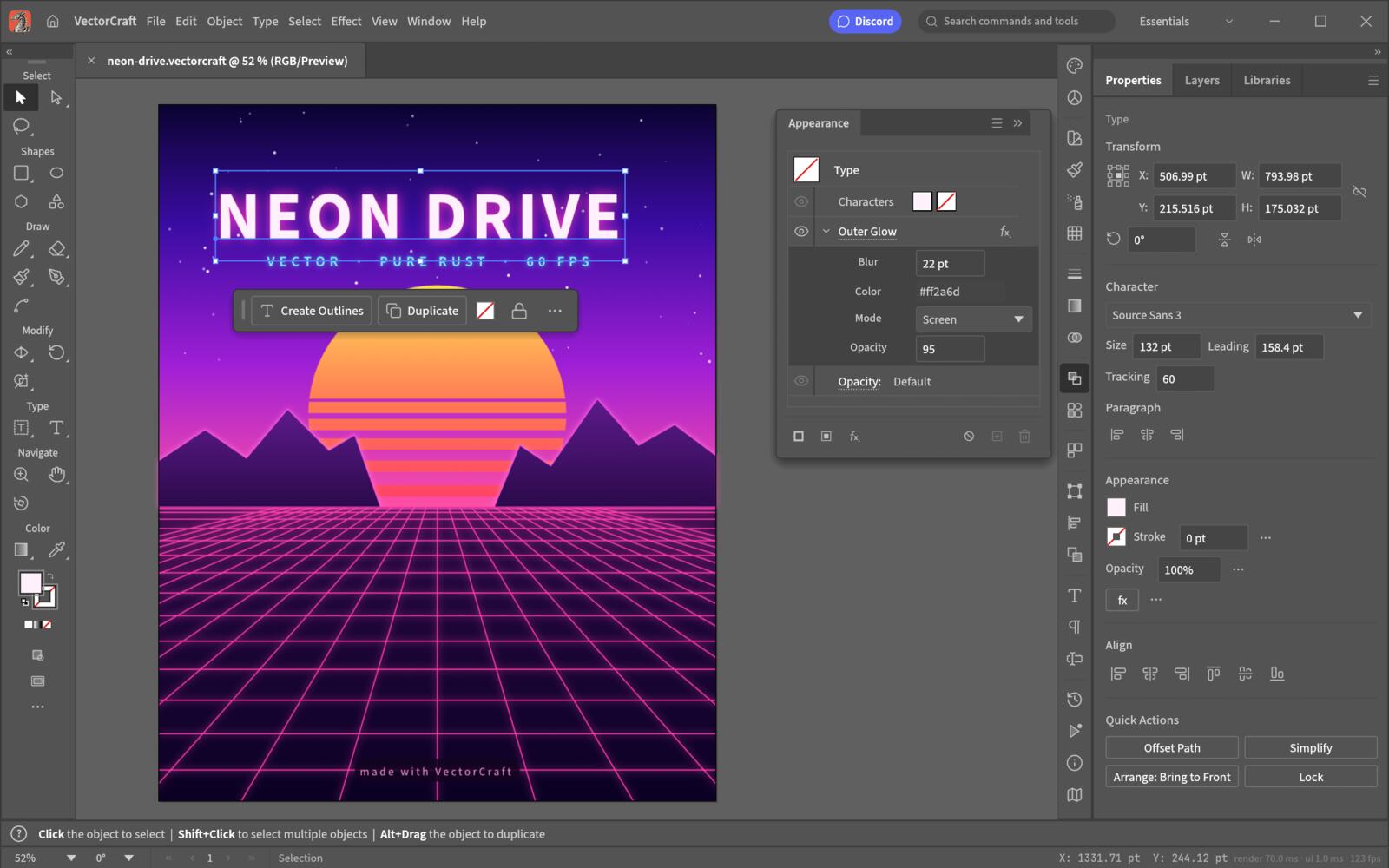
Choose VectorCraft when you want to evaluate a public, permissively licensed vector editor, work with SVG/PDF-oriented files, or explore a headless CLI and MCP workflow. Choose Illustrator when a production job depends on its mature feature depth, established plugin ecosystem, exact team handoff conventions or support expectations. Some designers can use both: VectorCraft for open-source experimentation and automation, Illustrator for the delivery stage that requires a known commercial environment.
| Aspect | VectorCraft v0.11.0 | Adobe Illustrator | How to decide |
|---|---|---|---|
| Product model | Open-source, pure Rust, alpha | Mature commercial vector application | Choose the risk profile your project can carry |
| Native working file | .vectorcraft | Illustrator document formats and Adobe workflow | Keep the native file for each editor |
| Interchange | SVG, PDF and PDF-compatible .ai documented | Broad Adobe and industry interchange workflows | Round-trip one of your actual files |
| Vector tools | Pen, paths, Pathfinder, Shape Builder, appearance, layers and type | Large mature tool and effect surface | List the exact tool or effect your job requires |
| Automation | JSON control channel, CLI and MCP documented upstream | Adobe scripting and extension ecosystem | Test the automation surface rather than assuming parity |
| Platforms | Desktop builds for macOS, Windows and Linux; WebAssembly build documented | Adobe-supported desktop ecosystem | Check your OS, GPU, fonts and deployment policy |
| Licence | MIT or Apache-2.0 at the project option | Adobe licence and subscription terms | Read the current terms before adopting |
| Maturity | Alpha and changing quickly | Established production product | Use a fallback when deadlines cannot absorb surprises |
The strongest VectorCraft argument is not that it has copied every Illustrator feature. It is that the project makes a different set of trade-offs. The code is public and written in Rust, the licence is permissive, and the application exposes a control channel designed to let a program drive the same operations a person uses. That opens practical experiments: repeatable SVG or PDF exports, agent-assisted cleanup inside a restricted project folder, and an editor a team can inspect rather than treating as a black box. It also makes a clean boundary visible. If a feature is missing, you can see that it is missing; if a file changes, you can record which release did it.
Maturity is a workflow feature. A commercial tool with years of production use brings answers for unusual files, colour and print handoff, type, effects, extensions, templates, team conventions and support. If a client gives you an Illustrator file built around a particular effect or plugin, the question is not whether VectorCraft has a similarly named menu; it is whether the artwork opens, edits and exports with the same meaning. For a deadline-bound job, keep the established tool available until your own corpus proves otherwise.
VectorCraft documents PDF-compatible .ai import and export. That is useful interoperability, but it should not be compressed into “full Illustrator file compatibility.” An .ai file can carry features, linked assets, fonts and effects whose behaviour depends on how it was produced. Test the exact file: open it, inspect layers and text, export a PDF, reopen the PDF, and compare the artboard bounds, colours and text placement. Keep a native copy from the originating application until the handoff is accepted.
Fonts are a silent source of layout drift. Missing fonts can change line breaks and artboard geometry, so a VectorCraft test must use the fonts installed on the target machine. Native Illustrator plugins are a separate boundary: VectorCraft has its own sandboxed extension direction and does not load arbitrary Adobe plugin binaries. Automation is another difference. VectorCraft documents CLI and MCP, while Illustrator users may rely on Adobe scripting or extensions. Compare the one action you need—opening a file, changing a colour, exporting ten variants—not a theoretical list of APIs.
If the test passes, VectorCraft has earned a place in that workflow; it has not earned a universal replacement label. If it fails, the failure is still useful because it tells you which file feature or production dependency matters. Repeat the test after an upstream release instead of relying on a comparison page that has outlived the build it describes.
| Scenario | Better starting point | Reason |
|---|---|---|
| Learning vector paths and SVG | VectorCraft | Open source, familiar tools and a format you can inspect |
| Existing Illustrator plugin is required | Illustrator | VectorCraft does not load native Adobe plugins |
| Headless export controlled by an agent | VectorCraft | CLI, JSON control and MCP are documented project surfaces |
| Print deadline with unknown client files | Illustrator or a mature fallback | Alpha compatibility risk is too high without a tested corpus |
| Team wants to audit and patch the editor | VectorCraft | The source and permissive licence are public |
There is no general winner. VectorCraft is compelling for open-source, cross-platform and agent-controlled workflows; Illustrator is stronger when mature features, plugins and production compatibility matter.
The project documents PDF-compatible .ai import and export. That does not promise perfect support for every Illustrator effect, plugin, linked asset or font, so test the files you actually receive.
No native Adobe plugin compatibility should be assumed. VectorCraft has its own extension direction, and native plugin binaries built for the Adobe SDK are not interchangeable.
VectorCraft is the relevant candidate because the project documents Linux desktop builds. Confirm the current release, GPU, display server and fonts before using it for a production handoff.
Only after a file-based pilot proves the workflows you depend on. Start with a small corpus, keep Illustrator or another mature fallback, and make the decision by tested deliverables rather than by feature-count claims.