ArtCraft, PhotoCraft vs Photopea: which browser editor should you install?
Photopea is a web editor that has run in a tab for years and is familiar to anyone who has opened one in a browser. PhotoCraft offers a browser build of the same Rust engine that runs on desktop, plus a native installer on four platforms. If you want the same engine whether or not the network exists, that is the comparison that decides it.
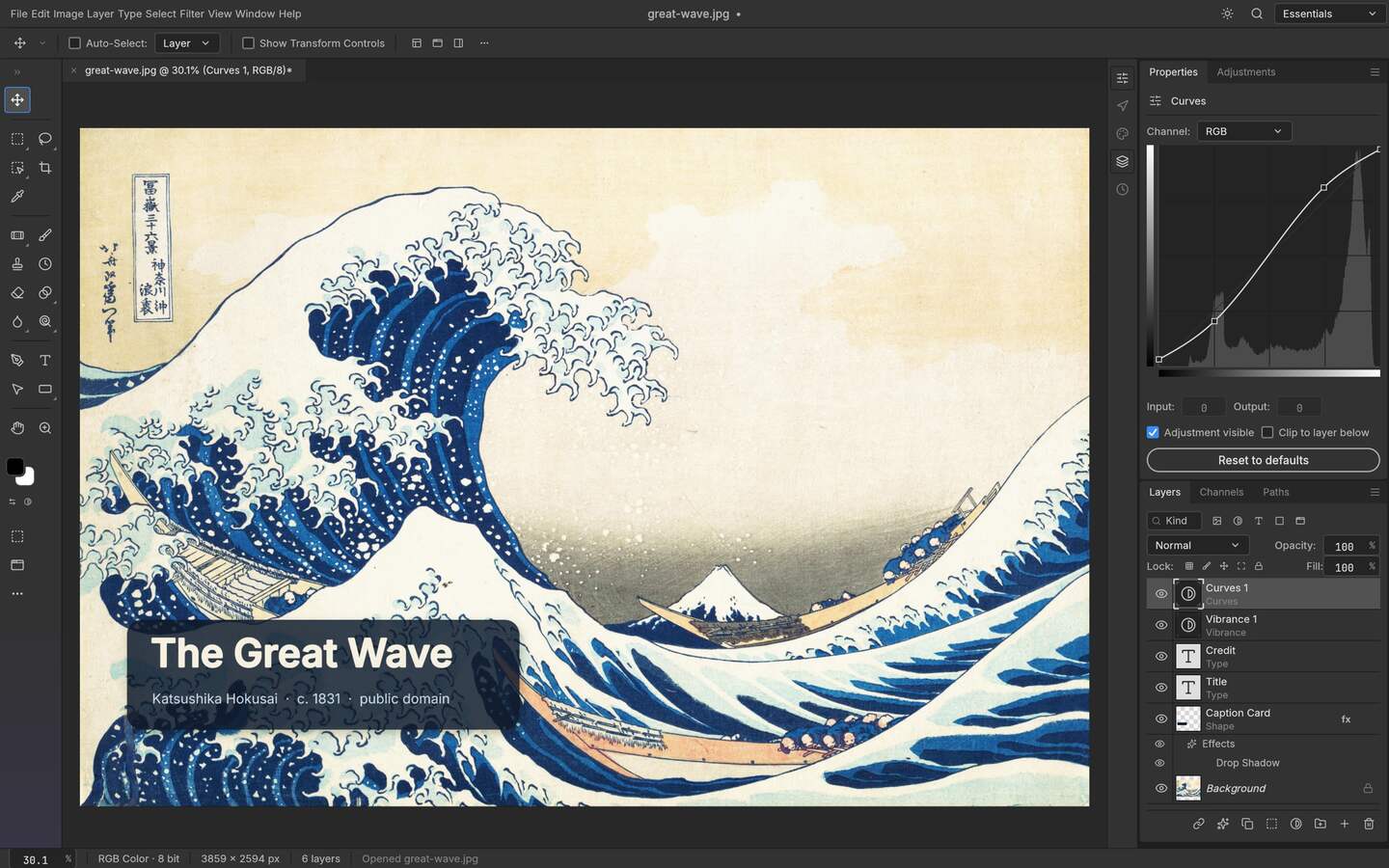
Upstream PhotoCraft interface preview; the artwork shown in the repository is public-domain source material. View the GitHub asset
The difference is not "in the browser"
Both can be opened in a tab, so that is not a useful distinction. What differs is whether the browser is the product or one packaging choice among several. A web-first editor is tuned for what a tab allows: fast start, no install, everything in one page. An editor that also ships native binaries is a codebase with a rendering engine, and the browser build is that same engine compiled to WebAssembly. When you outgrow the tab, one of the two has somewhere to go.
Build-to-build comparison
Checked differences
Aspect
PhotoCraft v0.9.0
Photopea
How to verify
Source availability
Open source, MIT or Apache-2.0, public repository
Proprietary web editor
Repository licence file; product site
Where it runs
Desktop binaries for four platforms plus a WebAssembly build
Primarily in a browser tab
Published release assets
Engine
Native GPU paths: Metal, Vulkan, DX12, WebGPU
Browser rendering pipeline
Project documentation
Automation
CLI, JSON action files, MCP server
No command-line surface of its own
Command tools in the release
Offline use
Installed build needs no network
Depends on the app being available in a tab
Install and disconnect test
Cost model
Free, local
Free with advertising or a paid tier
Product site
Choose PhotoCraft when
You want the same engine on a workstation and in a tab rather than two different tools.
The work is scripted: an action file over a directory, or an agent driving the editor through MCP.
A client file must come back as a layered PSD with its structure intact.
You need the editor to keep working on a machine with no network.
You want to read the source, or build for a platform the project does not ship.
Choose the web editor when
Someone needs a fix in ninety seconds on a machine you do not control.
The job is a quick composite rather than a project you will reopen.
You want behaviour that has been exercised in a browser for years rather than a build from last month.
Familiar menus matter more than automation or licence terms.
What an alpha costs you
The browser build of PhotoCraft carries the trade-off of its release stage: panels move, some files reveal gaps, and there is no support queue behind it. For a person doing this work daily, the offsets — a permissive licence, a local engine, a scriptable surface — usually justify that. For an emergency fix on someone else's laptop, nothing justifies it over a tool that opens instantly. They are different jobs, and a browser tab is not a migration path, only the convenient one somebody else chose for you.
The handoff question nobody mentions
A browser session and an installed document hand off work differently, and the difference shows up when the work has to move between people. In the session model the handoff is a flattened export plus a message describing what you did, and the person receiving it cannot see the structure underneath. In the document model the handoff is the working file itself, with layers named and masks intact, which is the difference between a colleague continuing your work and a colleague only looking at it.
Neither model is wrong, but they answer different problems. If your work is a quick fix delivered as a flat image, the session model is faster and simpler and needs no defence. If your work is a project reopened weeks later by someone else, the document model is what keeps it alive, and that is the reason to consider an installed engine over a tab you cannot restore on another machine.
There is a third case people forget: the machine you are handed. A browser editor is the only option when you cannot install anything, and in that situation the question is not which engine is better but which one you are permitted to use at all. The WebAssembly build answers it differently, because it arrives as an archive you can serve from anywhere, including a laptop with no network and no administrator rights.
Weigh that against the cost of adoption. An installed engine plus a self-served bundle takes an afternoon to set up and a decision to maintain; a hosted tab takes ninety seconds and asks nothing of you. For a one-off fix the tab is the right answer, and pretending otherwise would be a bad recommendation made only because it points at the tool this page is about.
Who this is for
Standardising one editor across desktop and lab machines
Needing a layered file that survives being reopened
Running edits from a script or an MCP client
Editing on a machine that must stay offline
Limits worth knowing
One of these is an alpha project; behaviour can change between builds, which is why versions are named.
Web editor internals are not public in the way an open-source repository is, so some comparisons describe observable behaviour rather than implementation.
Product names are trademarks of their respective owners and are used for identification only.
The questions people ask before choosing
01
Is there a free online editor that does not upload my photos?
That is the specific claim the PhotoCraft WebAssembly build makes: the desktop core compiled for the browser, working on files you open locally. A hosted editor is a different architecture whose privacy behaviour belongs to whoever runs the server.
02
Which is faster to start using?
The hosted browser editor. An installed engine needs a download and a first-run decision about GPU paths, and it will feel heavier than a purpose-built page until you compare the two on real work rather than on opening speed.
03
Can I automate either of them?
PhotoCraft exposes a CLI, JSON action files and an MCP server. The hosted web editor has no command surface of its own, which is the single difference that matters most when your work is repetitive rather than one-off.
04
What about licence and source access?
One project publishes its source under MIT or Apache-2.0 and its build matrix is readable in the releases. The other is a proprietary web application, so you take its behaviour as given and cannot build it yourself.
05
Should I switch from a web editor to this?
Switch for the job that hurts, not for the ideology. If layered files, offline work or scripted batches are where you lose time, the installed engine fits better; if you live in a shared browser tab, nothing here justifies the disruption.