ArtCraft, PhotoCraft vs Krita: which is better for layered artwork?
Krita is a painting program with a professional brush engine and animation tools, released under the GNU GPL v3. PhotoCraft is a photo editor whose organising bet is the layered document: PSD in, PSD out, plus a command line and an MCP server. Both are free, both keep layers, and neither is a better general answer — so this page compares the specific job of editing and returning layered files, and names what to test with your own artwork.
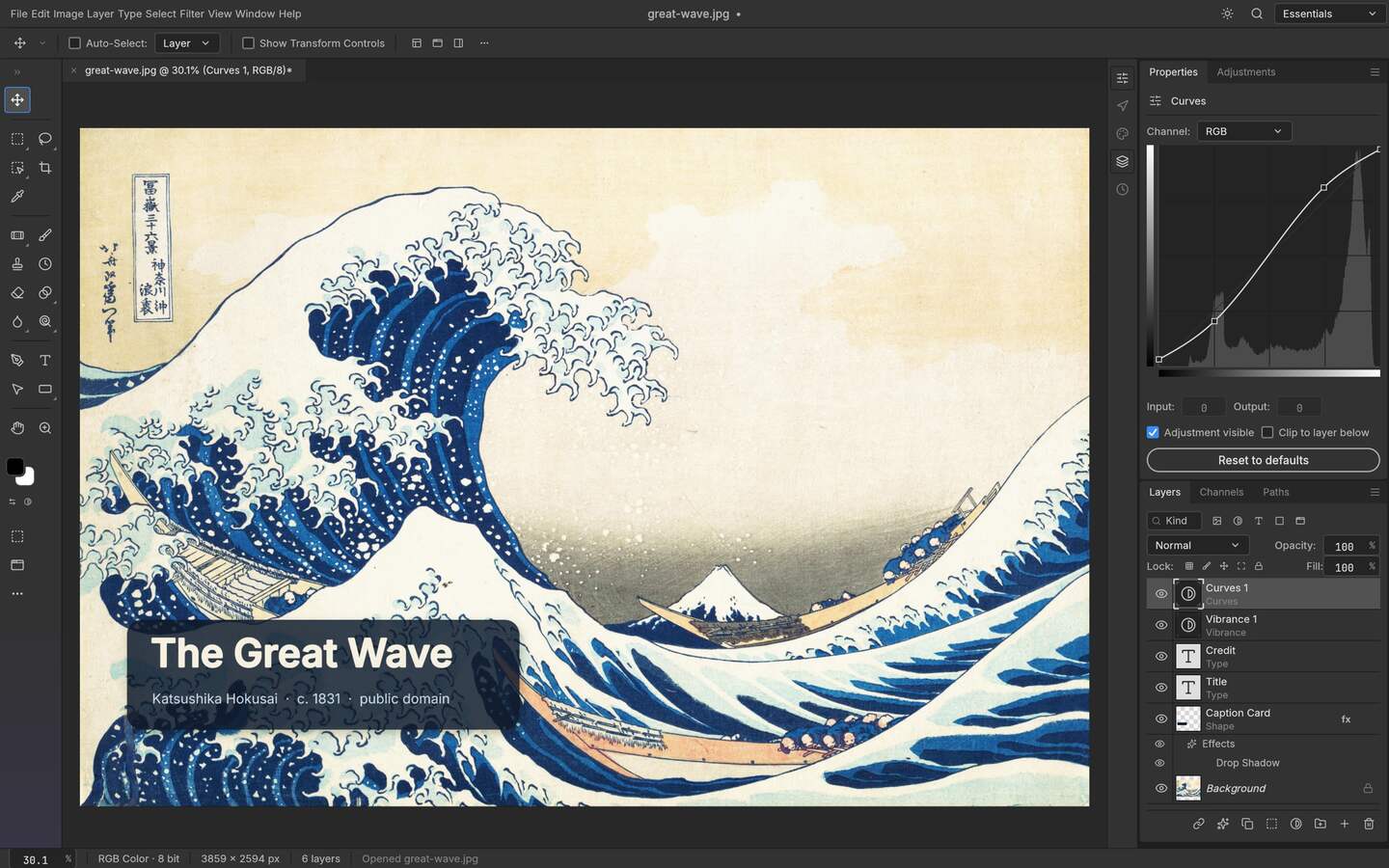
Upstream PhotoCraft interface preview; the artwork shown in the repository is public-domain source material. View the GitHub asset
Two different centres of gravity
Reading both projects side by side makes the difference obvious in one sentence: Krita is built around making marks, PhotoCraft is built around the document. Krita's own description leads with a professional free and open source painting program, and its feature list follows that priority — multiple brush types, drawing assistants, stabilisers, animation. PhotoCraft leads on the layer stack itself: adjustment layers, masks, PSD and PSB handling, GPU compositing, and a way to run the whole editor without a GUI. Those are two different tools that both happen to have a layers panel.
The comparison, with sources named
Checked differences, both sides dated 2026-10-14
Aspect
PhotoCraft v0.9.0
Krita 5.3.4.1
How to verify
Purpose stated by the project
A photo editor written from scratch in Rust, built around layers and PSD
A professional free and open source painting program
The repository description; krita.org
Licence
MIT or Apache-2.0
GNU GPL v3, and Krita states you may study, modify and distribute it under those terms
LICENSE in the repository; the Krita download page
Latest release checked
v0.9.0
5.3.4.1, dated 2026-10-07 on Krita's download page
GitHub Releases; Krita download page
Install targets
Linux in three architectures, Windows x64 and arm64, macOS universal, FreeBSD, plus a WebAssembly build
Windows installer and portable, macOS installer, Linux AppImage, Flatpak and snap, Android
Release assets; Krita download page
Phone and tablet reach
No Android or iOS build in the current release
Android builds are offered; Krita states iPads and iPhones are not supported
Krita download page
Layered file handling
PSD and PSB are working formats, with format compatibility tests in the repository
Layers, masks, groups and filters in its native document; interchange with other formats is its own pipeline
Open the same file in both and inspect the tree
Brush and paint work
Brushes exist as a layer type, not as the product's centre
Brush engine, stabilisers and drawing assistants are the reason people choose it
Draw one stroke with shake reduction on
Animation
Out of scope for an image editor
Animation tooling ships in the application
Krita feature pages
Automation
CLI, JSON action files and an MCP server
Scripting exists in the KDE ecosystem; check Krita's own docs for what you can drive unattended
Attempt the same batch in both
Stage
Early alpha
A long release line on a 5.x series
Each project's release history
Where Krita is ahead
Painting. If the work is drawing, illustrating, texture work by hand or frame-by-frame animation, Krita is the tool with the brush engine, the stabiliser, the wrapping-mirror workflow and a community of people who produce that work in it. It also ships to Android, which puts it on tablets and phones for sketching, while PhotoCraft has no mobile build to offer. Its release line is long, its documentation is extensive and its licence is the strongest copyleft of the two, which matters to some organisations and to contributors who want improvements returned upstream.
Where PhotoCraft is ahead
The photo-editing document model and the machine interface. Adjustment layers applied over a stack, masks that hide without deleting, and a PSD that can be saved and reopened with its structure intact is the specific problem this project set out to solve, and its repository keeps compatibility tests for that format rather than treating it as an import. Then there is the part Krita does not aim at: a CLI that runs one operation against one file, a JSON action file that applies a sequence across a directory, and an MCP server that lets an agent drive the editor. If your day is five hundred product shots rather than five hundred sketches, that is the difference that changes your afternoon.
The licence choice is a real difference too, not a moral one. MIT or Apache-2.0 gives a studio permissive options to carry patches forward or embed the editor in an internal tool, while GPL v3 brings reciprocal obligations when you distribute covered modified code. Choose the path that matches the way you ship.
Decide by scenario
Which one fits
Scenario
Choose
Because
Illustration, concept art, texture painting
Krita
The brush engine and drawing assistants are the product
Frame-by-frame animation
Krita
Animation tooling ships in the application
Retouching a layered PSD delivered by a designer
PhotoCraft
Layered PSD is its working format
Batch grading a directory from one definition
PhotoCraft
Action files, a headless CLI and MCP
Sketching on an Android tablet
Krita
Android builds exist; PhotoCraft has none
Embedding an editor in a proprietary internal tool
PhotoCraft
MIT or Apache-2.0 offers a permissive path, subject to the chosen licence terms
Either, if the file must survive a handoff
Test your own files
The round trip is the only honest arbiter
Twenty minutes that settles it
Take one layered file you actually shipped, open it in both, and count layers, groups and masks against the original.
In the receiving editor, add one adjustment layer and one mask, then save and reopen: did the structure survive the write, or only the read?
Do one job you repeat weekly. In Krita, note the clicks. In PhotoCraft, write the action file. Compare the second run, not the first.
If animation or hand-drawing appears anywhere in your week, Krita is probably the right tool and no table here will change that.
Who this is for
A photographer deciding whether an illustration tool is a photo editor substitute
A studio standardising on one editor for both painting and layered delivery
Someone who needs PSD files to survive a Linux workstation
A pipeline where repetitive grading must be scripted rather than painted
Limits worth knowing
Krita statements here come from krita.org and its download page as read on 2026-10-14; feature availability is defined by Krita's own documentation.
PhotoCraft is early alpha, so anything here about its behaviour is a statement about a specific build.
No claim is made that either tool replaces the other; they are aimed at different kinds of work.
Krita is a name and mark of its project; it appears here only to identify the product being compared.
The questions people ask before choosing
01
Is PhotoCraft or Krita better for photo editing?
PhotoCraft, for the reasons in its scope: it is described as a photo editor, its document model is layers with adjustment layers and masks, and it treats PSD as a format it writes as well as reads. Krita is a painting program, and asking it to grade photographs is asking the wrong specialist.
02
Can Krita open a PSD file?
Krita reads layered files through its own document pipeline; what survives a save-and-reopen cycle depends on the effects in your specific file. The only test that matters is yours: open, save, reopen and count the layers against the original.
03
Are both of them free for commercial work?
Yes, in different ways. Both are free software with no licence fee, but Krita is GNU GPL v3 and PhotoCraft is MIT or Apache-2.0, and those licences impose different duties if you distribute a modified build.
04
Which one runs on Linux?
Both. Krita publishes Linux AppImage, Flatpak and snap builds; PhotoCraft publishes Linux archives and packages for three architectures and adds Windows, macOS, FreeBSD and a WebAssembly build. Neither depends on a Windows-only compatibility layer.
05
Should I learn Krita or PhotoCraft first?
Learn whichever matches the work you actually do weekly, because the layer model, masks and non-destructive habits transfer between them anyway. If you draw, start in Krita. If you deliver layered files to other people, start in PhotoCraft.