ArtCraft vs Microsoft Office in 2026: is the Craft suite comparable?
ArtCraft and Microsoft Office are not the same kind of product, even though the expanding Craft Apps lineup now includes WordCraft, GridCraft and DeckCraft alongside ArtCraft, PhotoCraft and VectorCraft. ArtCraft is an AI creative engine for directing images, scenes and motion; Microsoft Office is a mature productivity suite for documents, spreadsheets, presentations and collaboration. The useful comparison is about whether the Craft apps give you a practical open-source alternative for one bounded workflow—not whether a new family has already reproduced an entire office ecosystem.
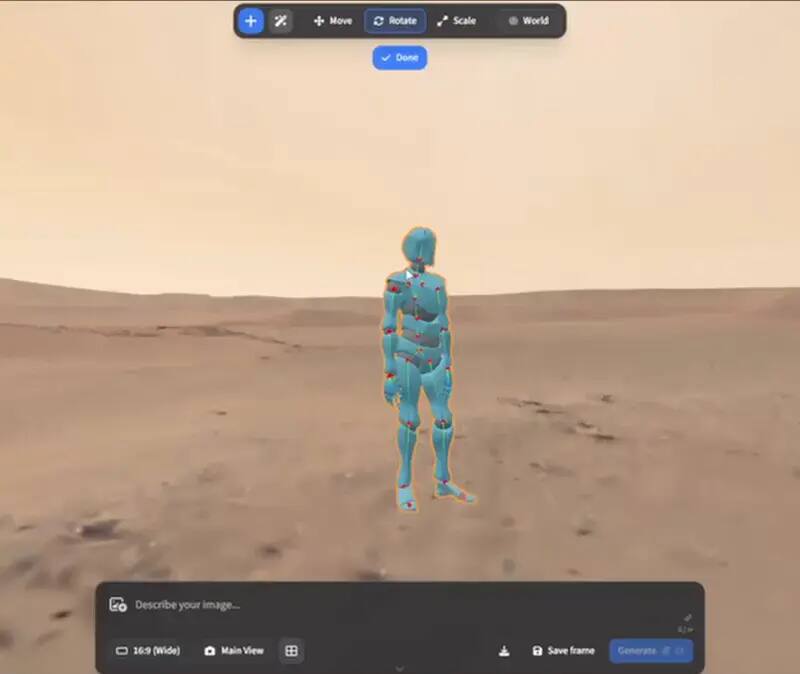
Upstream ArtCraft character-posing preview; availability and model behaviour remain version-dependent. View the GitHub asset
Short answer: this is a family-to-suite comparison
Microsoft Office is one mature suite with shared conventions around Word, Excel, PowerPoint, file handoff, accounts and collaboration. The Craft Apps lineup is a set of separate open-source projects with separate repositories, release tags and maturity levels. WordCraft covers writing, GridCraft covers spreadsheets and DeckCraft covers presentations; ArtCraft adds an AI image and video workflow that is outside the normal Office category. The comparison therefore helps you decide which project to test first, not whether one installation can replace every office task.
Suite shape and workflow boundary
Dimension
Craft Apps / ArtCraft
Microsoft Office
Practical reading
Suite shape
Separate projects: WordCraft, GridCraft, DeckCraft and creative tools
Integrated mature office suite
Expect separate release and compatibility checks
Documents
WordCraft, in development, DOCX workflow to test
Word with mature document and review surface
Use a real document corpus before changing tools
Spreadsheets
GridCraft, in development, CSV/XLSX workflow to test
Excel with broad workbook and data features
Macros, connectors and complex formulas need dedicated tests
Presentations
DeckCraft, in development, slide/export workflow to test
PowerPoint with mature themes, media and presentation tooling
Fonts and media can decide a live-talk workflow
AI creative work
ArtCraft directs model-provider image/video steps
Office AI features are a separate product and plan question
Do not treat AI generation as document-suite parity
Privacy boundary
Local/browser boundaries vary by project; providers may be involved
Depends on account, plan, desktop and cloud settings
Map the actual data path
Maturity
Mixed, with Office projects early and moving quickly
Established production suite
Use fallbacks while the Craft projects are evaluated
The Office trio: WordCraft, GridCraft and DeckCraft
The cleanest way to evaluate the Office story line is one app at a time. WordCraft is the writing test: can a representative document preserve headings, tables, images, fonts and the handoff steps your team uses? GridCraft is the spreadsheet test: can a sample workbook preserve values, formulas, formats, sheets and the export path without relying on unsupported macros or connectors? DeckCraft is the presentation test: can the sample deck preserve fonts, layout, images, media and aspect ratio on the machine that will present it? Each result should carry the app release, browser or desktop environment and the file used.
A shared brand name does not make the three editors one office suite. They may share a design language or upstream story, but each project has its own source, release and limits. Keep the source links visible and do not imply that a WordCraft document, GridCraft workbook and DeckCraft deck share a universal account, cloud drive or recovery service on OpenCraftTools. The portal is an independent directory and context layer, not the provider of an Office replacement backend.
Where ArtCraft fits—and where it does not
ArtCraft belongs in a creative production comparison, not in a claim that it replaces Word, Excel or PowerPoint. It helps direct image and video work: composite a still, arrange a scene, set a camera or pose, choose a model provider, request a generation and finish the result in an editor such as PhotoCraft. Local composition steps can be iterated without per-run generation cost, while model-provider steps involve accounts, network use and pricing. That is a different cost and privacy model from preparing a memo or spreadsheet.
The useful connection is workflow adjacency. A team may write a brief in WordCraft, build a plan in GridCraft, prepare a deck in DeckCraft and use ArtCraft for visual exploration. That can be a collection of tools worth testing, but it is not evidence that the collection has Office-level collaboration, templates, accessibility, review, printing, identity, support or file compatibility. Keep those as explicit acceptance criteria.
File compatibility: one format at a time
DOCX, XLSX and presentation files are containers for much more than visible text or numbers. A document can carry styles, fields, comments, tracked changes, embedded objects and fonts. A workbook can carry formulas, named ranges, charts, external links, macros, hidden sheets and data connections. A presentation can carry themes, transitions, media, speaker notes and links. The Craft app pages describe the right first tests, but the rule is shared: do not promote a feature from “the editor opened my sample” to “the workflow is compatible” until the receiving application reopens the saved result.
Minimum evidence before a suite decision
App
Representative sample
Acceptance evidence
WordCraft
DOCX with styles, table, image, font and revision need
Reopen in the delivery application and compare layout and editable structure
GridCraft
CSV and XLSX with formulas, formats and the required data path
Compare values and calculations after export; test large or specialised features separately
DeckCraft
Slides with fonts, images, layout and any media used live
Present or rehearse the export on the target machine with a fallback copy
ArtCraft
A still, scene plan and short generated shot
Record provider, model, cost, release and finishing result; judge motion at full size
Privacy, accounts and cost are not one checkbox
The Craft projects have different boundaries. OpenCraftTools provides no account, upload or server-side recovery for the browser editors described here. ArtCraft’s generation steps can call external model providers, so provider accounts and per-run pricing are part of the workflow. Microsoft Office can be deployed locally, connected to an account, or used with cloud collaboration depending on the product and plan. A fair comparison maps the actual document, workbook, deck or image path rather than declaring one suite private from its name.
The same applies to cost. Open-source software can reduce licence cost while increasing evaluation, support and migration work. A paid suite can cost more directly while reducing the risk of a failed handoff. ArtCraft adds another cost axis because generation steps can be priced per image, clip or provider operation. Record the cost of a successful workflow and the cost of a retry, not only the headline licence.
A staged migration plan for 2026
Keep the Office baseline
Write down the Office features, formats, fonts, review rules, storage and delivery machines that are non-negotiable.
Pilot WordCraft, GridCraft and DeckCraft separately
Use a small corpus and run one file round trip per app before combining the tools into a team workflow.
Add ArtCraft only for creative work
Treat model-provider accounts, cost and output review as a separate lane from office documents.
Have recipients validate the outputs
The person who receives the file or presents the deck should perform the acceptance check.
Expand only after evidence
Keep mature fallbacks for complex work and record the release tags that passed the pilot.
Verdict by need
Which direction is sensible?
Need
Start with
Why
Mature office collaboration
Microsoft Office or an established suite
The suite and team conventions are already proven
Open-source document experiment
WordCraft
Small, inspectable browser and release canary
Open-source spreadsheet experiment
GridCraft
Test values, formulas and export against a real sheet
Open-source presentation experiment
DeckCraft
Test fonts, layouts, media and delivery on a sample deck
Directed AI image/video workflow
ArtCraft
Composition, scene, model choice and generation are its actual job
Full replacement decision
A staged corpus pilot
No page can prove suite-level parity without your files and recipients
Who this is for
Evaluating the ArtCraft Office story line
Comparing separate Craft apps with a mature office suite
Planning a staged open-source pilot
Separating AI generation from document workflows
Limits worth knowing
This comparison is not a product parity, procurement or legal conclusion.
The Craft Office projects are in development and upstream releases can change quickly.
Microsoft, Word, Excel and PowerPoint are referenced for identification only; no endorsement or affiliation is claimed.
A suite decision requires real files, devices, recipients and current upstream checks.
The questions people ask before choosing
01
Is ArtCraft an open-source Microsoft Office alternative?
Not by itself. ArtCraft is an AI image and video workflow. WordCraft, GridCraft and DeckCraft are the Craft projects that map more directly to Word, Excel and PowerPoint, and all three need separate compatibility pilots.
02
Can the Craft Apps replace Microsoft Office?
Only for bounded workflows that pass a real-file test. The projects are separate and in development, while Microsoft Office has mature suite, collaboration and document conventions. Keep a fallback for complex work.
03
Are WordCraft, GridCraft and DeckCraft one suite?
They are part of the same Craft Apps story line but have separate projects, releases and compatibility boundaries. OpenCraftTools does not provide a shared account or cloud office backend for them.
04
Where does ArtCraft’s cost come from?
Local composition work can be iterated without a per-run generation charge, while selected model-provider steps can require accounts, network use and per-image or per-video pricing.
05
What should a team do before switching?
Inventory its real files and delivery rules, pilot each Office app separately, have recipients reopen the outputs, and keep a mature fallback until the evidence is repeatable.